If you work in product or QA, you've probably seen the term "Agentic QA" floating around. It sounds futuristic, like AI bots testing your product while you sleep. But the truth is, you don't need to reinvent your QA process or build your own AI agents from scratch to start using them. You can begin small, with the tools already available.
Let’s break down what Agentic QA really means, and how you can take some practical steps toward it.
What “Agentic QA” Really Means
In simple terms, Agentic QA is about bringing intelligence and autonomy into your testing process.
Instead of relying only on manual test cases or rigid automation scripts, you start leveraging AI tools that can:
- Understand your project context
- Analyze documentation or code
- Suggest tests or edge cases
- Help you reason through design decisions
It’s not about replacing testers, it’s about enhancing what you already do.
Step 1: Centralize and Query Your Documentation
If your documentation lives across Confluence, Google Docs, and Jira comments (we’ve all been there), start by consolidating it into a single AI-friendly place. You can use tools like Gemini (Google’s AI) to store and query your docs.
For example:
- “What are the acceptance criteria for the payment flow?”
- “Which endpoints handle user authentication?”
The AI can instantly summarize or find the exact answer — no more endless scrolling through tickets or wikis.
👉 Why it matters: This builds a habit of using AI as a project knowledge assistant, one of the first steps toward agentic thinking in QA.
Define Your AI Agent Upfront
I recommend taking a few minutes up front to define what kind of help you need from your AI agent. Here are a few basic example agent definitions:
- QA Expert Agent: You are a QA engineer with 15 years of experience in functional manual testing, API testing, and test automation. Your role is to analyze software requirements, generate test cases, and report issues, strictly based on the documentation provided.
- Tool Scout Agent: You are a senior QA who specializes in identifying new tools and industry trends. You strip away marketing fluff and recommend only tools that are practical, effective, and genuinely trending.
- Risk-Aware PM Agent: You are a project manager focused on spotting risks, blockers, and emerging patterns across product and QA documentation.
Even when working with the same documentation, each agent will return very different insights.
Step 2: Analyze Your Code to Discover Test Opportunities
The successive easy win: let an AI tool like Cursor help you analyze the existing codebase.
You can ask it to:
- Identify key functions or components
- Suggest edge cases or missing tests
- Even generate initial test scripts in your preferred framework
For example:
- “Help me generate test cases for the user registration functionality.”
- “What are possible failure scenarios for this API call?”
👉 Why it matters: Instead of writing tests blindly, AI helps you test smarter, based on the actual code logic.
What’s One Tip I Learned Along the Way?
Here’s some practical advice on using these tools in real projects.
Ask the tool for a focused scope.
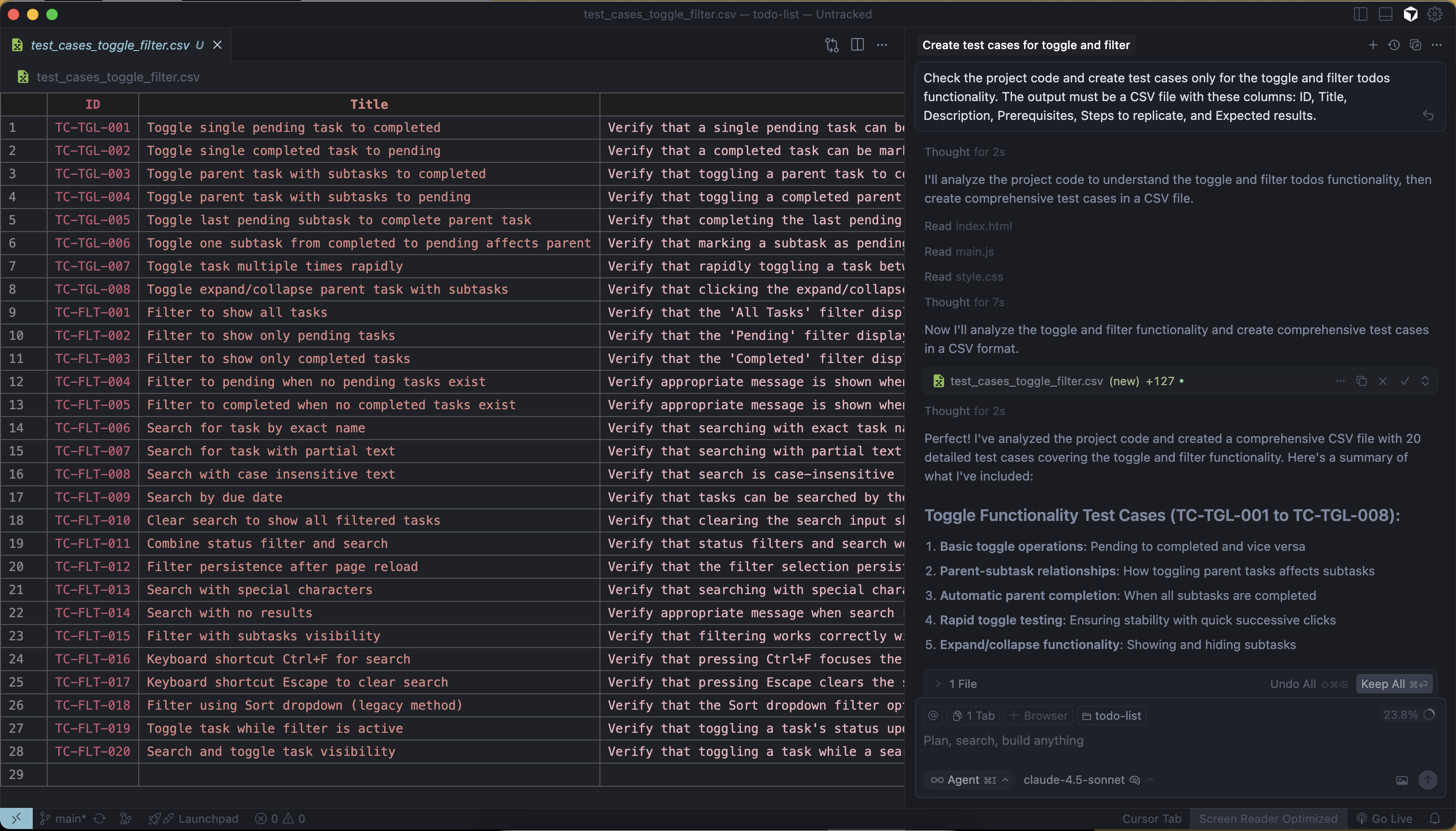
Cursor (and similar tools) work best when you give it a narrow, well-defined task. Don’t expect it to analyze an extensive application and produce perfect test coverage in one go.
Give a precise prompt example (copy/pasteable):
Check the project code and create test cases only for the Payments functionality. The output must be a CSV file with these columns: ID, Title, Description, Prerequisites, Steps to replicate, Expected results.Generate test cases only based on the existing code; do not make assumptions.
-
Why this helps:
By limiting scope, you get more accurate, relevant test cases. The tool can focus on actual code paths and produce CSV-ready output you can import into your test management system.
Always double-check the results, and here's specifically what to look for:
The AI generates tests from the code itself. If the implementation is incorrect (a bug or a shortcut), the generated tests might reflect that incorrect behavior instead of the intended behavior.
When reviewing AI-generated tests, ask yourself:
- Does this test validate the business rule, or just the technical implementation?
- Are there negative test cases for invalid inputs or error conditions?
- Does this match what the product owner or user actually expects?
- If this code has a bug, would this test catch it, or would it pass because it's testing the wrong behavior?
Practical workflow:
-
Run the focused prompt for one feature.
-
Import the CSV into your test tool or spreadsheet.
-
Review tests with a developer or PO to validate expected behavior.
-
Iterate (fix code or refine tests) and re-run as needed.
Step 3: Use AI for Design Reviews — Before Development Starts
Agentic QA isn’t just about catching bugs; it’s about preventing them.
Before a developer even writes a line of code, tools like Gemini and Claude can help QA analyze the proposed designs, workflows, or user stories.
Try providing some designed flows and asking: “What test cases would you suggest based on this Figma design?”
You’ll be surprised by how much early feedback an AI can give, often catching inconsistencies or gaps you might not see at first glance.
👉 Why it matters: This moves QA upstream, making quality part of the design conversation.
Step 4: Experiment and Reflect
Start small. Pick one or two of these workflows, try them for a sprint, and observe the results.
Ask yourself:
- Did it save time?
- Did it uncover insights I might’ve missed?
- Did it make collaboration easier?
You don’t need to have a perfect “agentic pipeline” to benefit.
Every experiment helps you understand how AI fits into your real-world QA culture.
What Challenges and Cautions Should We Know About?
As helpful as AI can be, it’s not infallible, and that’s important to remember when starting with Agentic QA. Here are two common pitfalls to watch out for:
1. Outdated or incomplete documentation
If your project documentation isn’t up to date, AI tools like Gemini or Claude might give technically correct answers… but based on old information. That can lead to misplaced confidence or incorrect assumptions about your system's current state.
👉 Tip: Whenever you use AI to query documentation, validate its answers against the latest version or check with a teammate who knows the context.
2. Incorrect code that looks “right”
When you use tools like Cursor to analyze your code or generate test cases, remember that AI learns from what it sees.
If there’s a bug or an incorrect implementation, the model might assume that’s the expected behavior and generate tests that reinforce the mistake rather than catch it.
👉 Tip: Always review AI-generated tests manually, especially for core logic, to make sure they validate the intended behavior, not just the existing one.
What Does the Future of QA Look Like?
The development process is evolving rapidly, and not just for developers; AI tools are changing how we design, build, and assure quality across the entire product lifecycle. For QA professionals, this means one thing: we need to adapt.
Learning to work with these tools: to question, validate, and integrate them into our workflows: is how we stay sharp and relevant in the IT market.
Agentic QA isn’t about replacing what we do… It’s about evolving how we think, so we can keep adding value. AI makes testing faster and smarter, but quality assurance still requires assurance, and that's the human part.