

Machine Learning
From Dashboard to Dialogue: Evolving data analytics with conversational Artificial Intelligence
The Challenge: When the Dashboard Isn't Enough
For years, our client's stakeholders navigated a familiar ritual: open the dashboard, locate the right chart, cross-reference a few filters, and piece together an answer to a question that had been on their mind since the morning standup. For straightforward queries, such as total sales by region and inventory levels at a glance, the dashboard did its job. But the moment a business analyst needed something more specific, like comparing inventory levels across two different periods, the workflow broke down entirely. And if the user needed to go one step further, such as building a summary table by slicing the data with multiple filters, the process quickly became time-consuming and impractical.
Our client is a global operation, with business analysts spread across markets worldwide, each focused on their own specialty. Their Looker dashboard is well-built and serves its purpose, but it was designed around a fixed set of views, and that's the core constraint: the teams responsible for maintaining it can't keep up with every ad-hoc need a business analyst has. Adding a new view, filter, or metric for each request isn't sustainable. So when analysts needed data that the dashboard didn't expose, the natural fallback was to go to the source, which meant filing a request with the data engineering team. This often led to additional requests for new data breakdowns tailored to specific analytical needs, further increasing the system's complexity. Over time, the dashboard evolved into a much larger, more difficult-to-manage product, especially for new users, who had to navigate an increasing number of filters and configurations just to find the specific data they needed.
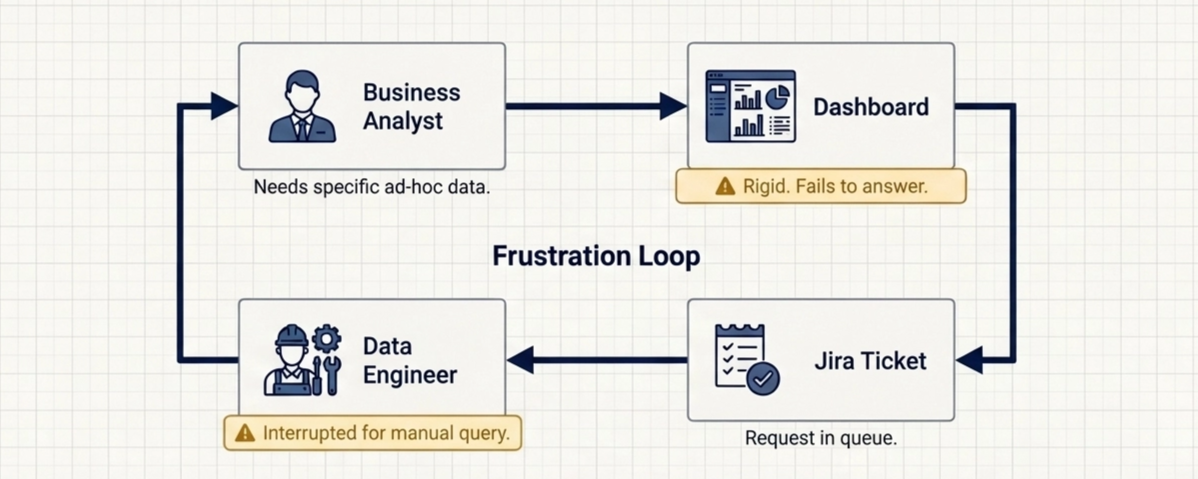
This created a misalignment that everyone felt. Data Engineers whose core value is building robust and reliable data pipelines shouldn't spend time running ad hoc queries for business analysts. And business analysts whose core value is turning data into insights should spend time analyzing the data, not figuring out where the data lives and how to access it.
What We Built: Conversational Analytics, Grounded in Real Data
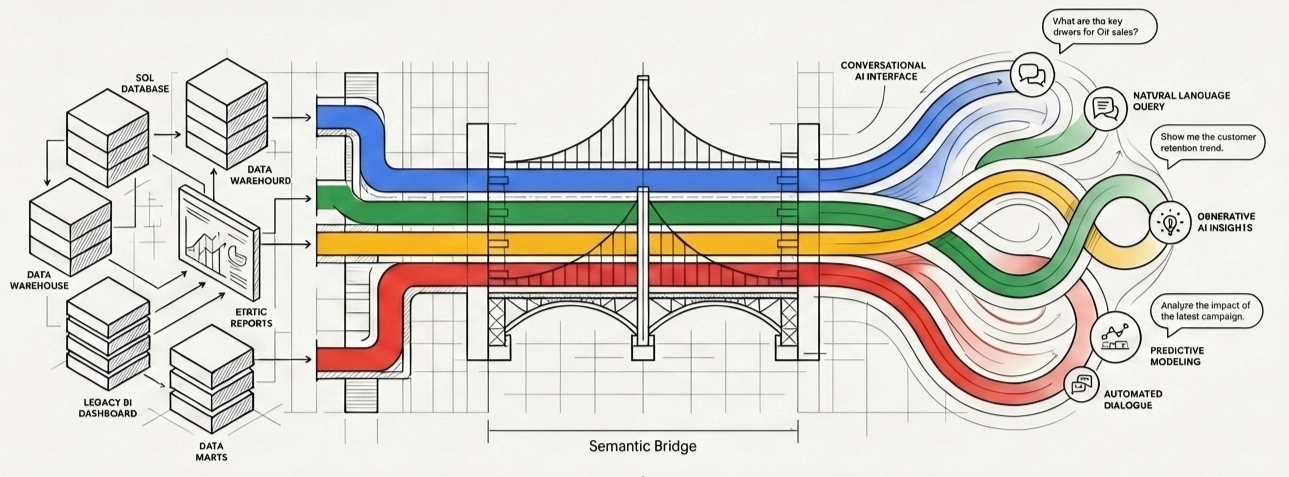
We created a Looker's Conversational Analytics Agent that was powered by the client's existing LookML models, which already powered the dashboard business analysts used. They can now ask questions in plain language and get precise, data-grounded answers without needing to understand the underlying data structure, table relationships, or filtering logic. This significantly reduced the dependency on both data engineering and BI teams for day-to-day analytical needs.
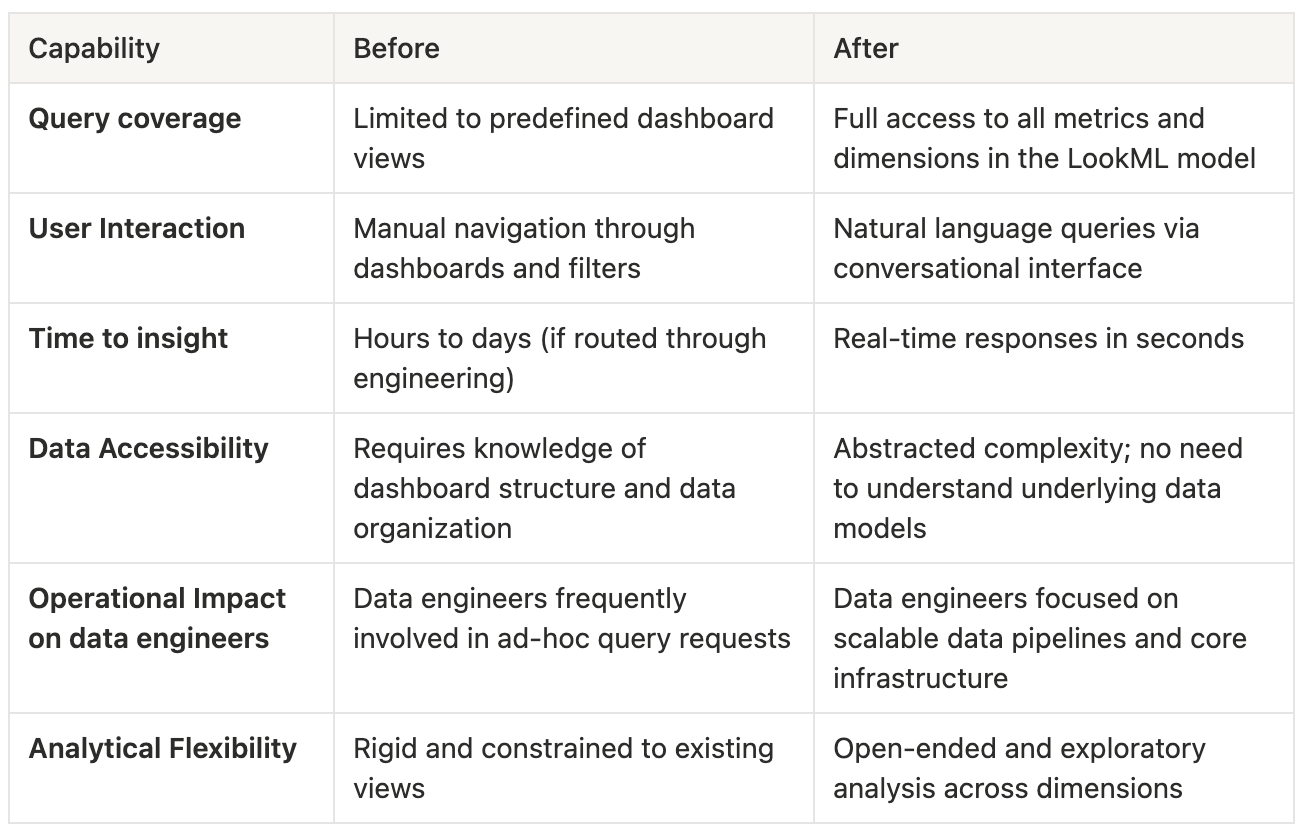
Before: A fixed set of supported queries, limited to what the dashboard already exposed. If the answer wasn't in an existing view, it wasn't accessible. If the user needed to combine different metrics into a table, they had to do it manually. Additionally, navigating multiple filters and views to reconstruct a specific analysis made the process slow, error-prone, and highly dependent on each user's dashboard familiarity.
After: Full coverage across every metric and dimension in the data model. Exploratory, specific, cross-dimensional questions. We were also able to join with other tables (e.g., date-related) to provide more relevant data directly to the user, such as different periods (seasons, quarters, etc.). Instead of the user having to select all the weeks for the current year and check the sales value in the dashboard, it would just ask, "What's the total sell-out value this year?” And if the user needs the sellout value for each of the last 3 years, it will show a table with all relevant metrics (sellout, growth, etc.) differentiated by year.
This approach not only accelerated time-to-insight but also standardized how metrics were calculated and interpreted across the organization, reducing inconsistencies between teams. It empowered business analysts to focus on decision-making rather than data extraction, while ensuring that all answers remained fully aligned with the governed data model defined in LookML.
The Before and After in Practice
The Hardest Part: Adapting the LookML Model
The client already had a LookML model that was powering the existing dashboard. But our first tests returned poor results. The agent didn't understand the terms that the analysts used in their day-to-day work.
Making the necessary changes to the LookML model so that the agent could use it effectively was one of the biggest technical challenges of the project. The model had to be structured in a way that let the agent understand relationships between dimensions and metrics, navigate exploration correctly, and return meaningful results for open-ended, unpredictable questions, and not just the queries the dashboard was designed to answer. Since users weren't going to change how they communicated, our mission was to get the agent to speak the way they did. That meant adding dimensions in terms that users understood, rather than requiring them to adjust to how the values are stored in the database. Additionally, we were able to bring all sorts of date-related dimensions into the LookML model because they were aware of seasons and quarters, and the data was stored at the weekly level. This way, users didn't have to specify which weeks they were interested in, and just say, I want the data for Q1 2025 and compare it with Q1 2026.
First Impressions
At first glance, the agent seemed to be doing its job. Accuracy was solid, and answers were generally correct. But once analysts started using it in their day-to-day work, friction quickly surfaced.
The biggest issue wasn’t correctness; it was workflow.
Analysts found themselves repeating the same instructions over and over again. Every new question required reapplying the same filters: “Product X in Location Y”, again and again. Since the agent didn’t retain context across conversations, what should have felt like a fluid interaction instead became repetitive and mechanical.
Then came the second layer of friction: usability.
Even when the agent returned the right answer, users couldn’t easily do anything with it. If they wanted to continue analyzing the data, they had to return to Looker, open Explore, download a CSV, and import it into a spreadsheet. What should have been a seamless flow from question to insight turned into a multi-step workaround.
And when things failed, which they inevitably did, the recovery process wasn’t much better.
Users reported issues via a messaging app, but those reports often lacked context. If the problem happened on the third or fourth question of a session, only the final query would be shared. That left us guessing. We had to go back and forth, asking for missing context and reconstructing the conversation manually.
It worked, but it was messy, slow, and far from scalable.
At that point, it became clear: the problem wasn’t the agent, it was everything around it.
How it ended up: From a Tool to a System
We realized that improving the agent alone wasn’t enough. The real opportunity was to rethink the entire experience.
So we made a bold decision: we moved away from Looker’s native Conversational Analytics UI and built our own web app. This gave us full control over two things we were missing: context management and observability.
On the user side, we redesigned how context was handled. Instead of forcing analysts to repeat themselves, we introduced persistent instructions. Users could define their context once, either as free text or by selecting from predefined filters, and the system would automatically apply it to every query. Even better, this context was stored. The next time the user came back, everything was already in place. The interaction finally felt natural.
At the same time, we removed one of the biggest usability pain points: exporting data. Instead of forcing users to download CSV files and import them manually, we enabled direct copy-paste from the interface into spreadsheets. A small change, but one that had a massive impact on daily workflows.
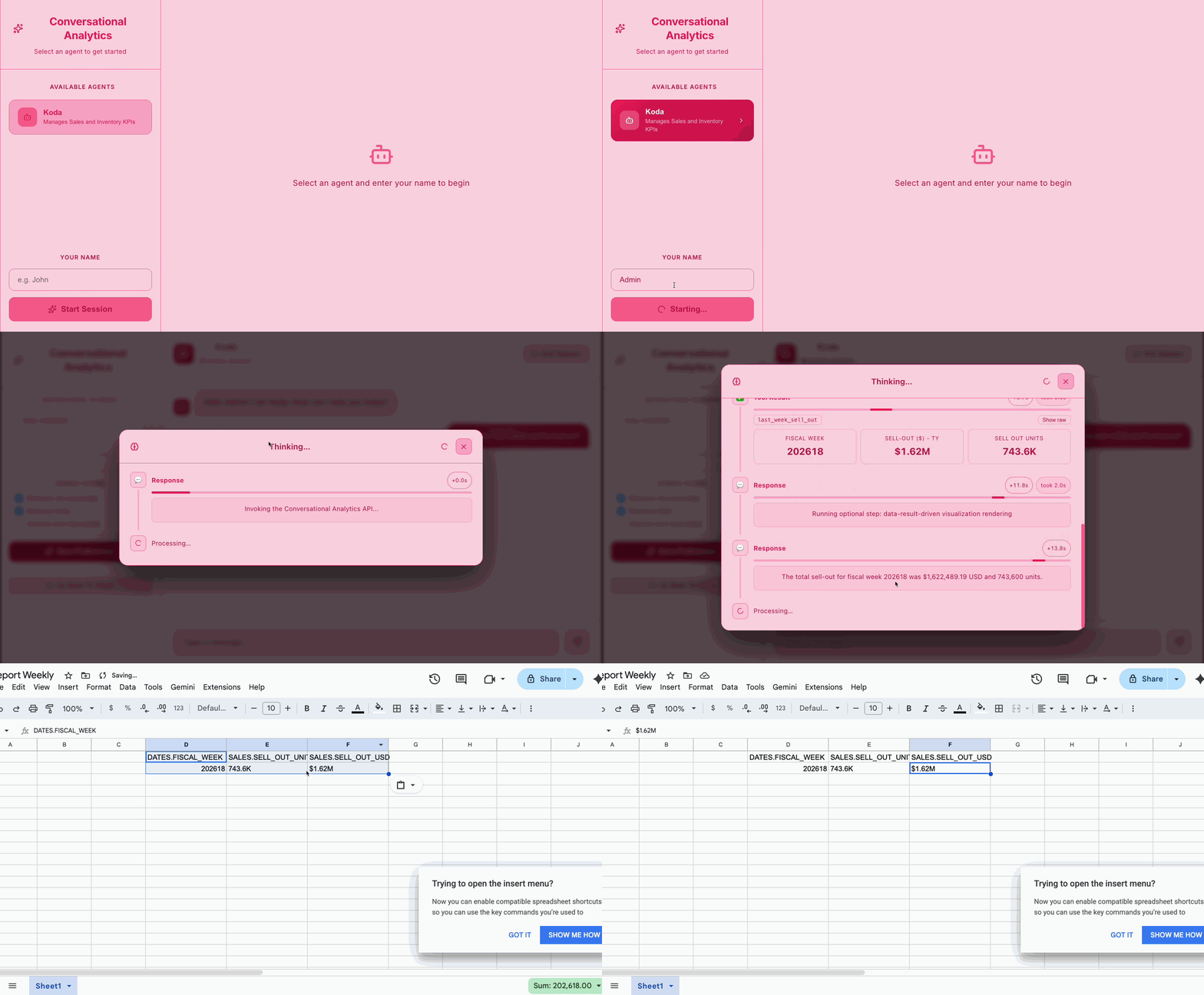
On the system side, we went deep into observability. Every question, every answer, every intermediate step was tracked. Users could provide feedback directly, and each interaction was linked to a full trace of the events that happened behind the scenes. But we didn’t stop there; we automated the entire feedback loop.
A Pub/Sub pipeline picked up new feedback entries, sent them to our messaging app, and automatically created Jira tickets. Each ticket included the query, the answer, the user feedback, and a trace ID that allowed us to reconstruct the full context instantly. No more chasing users. No more missing information. Everything we needed was already there.
We relied on Gemini Data Analytics to power the backend and on BigQuery to store the questions and answers, user preferences, and feedback.
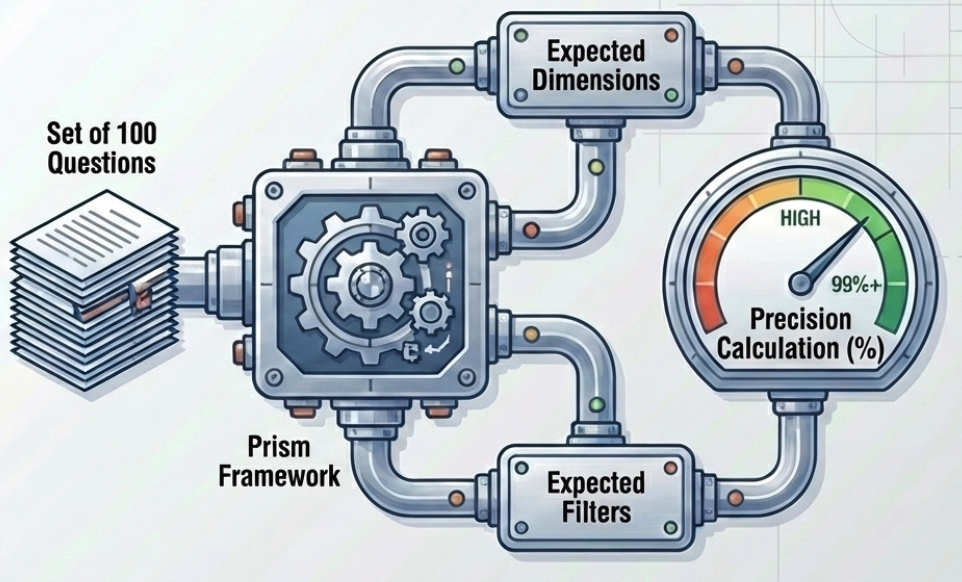
Finally, we introduced automated evaluation using Prism. We defined a benchmark of 100 questions, each with expected dimensions and filters, and continuously measured the agent’s accuracy. This gave us a reliable, repeatable way to validate improvements and catch regressions early.
What started as a conversational interface evolved into something much bigger: a fully instrumented, continuously improving analytical system.
What's next
The agent was released only to a selected group of users, so we could manually inspect what was failing. As we become more confident in the agent's performance, we will target more users, and at some point, it will be impossible to keep up with all the feedback manually. We are interested in creating an agent that can pull feedback (with relevant context), modify code/instructions, and test the changes using the Prism framework. A pure self evolving agent.
We would then be reviewing those failing cases where the agent wasn't able to create the proper adjustments to the code/instructions.
Conclusion
Conversational analytics isn't a replacement for dashboards but a complement to them. Analysts who want to explore data in depth still have full access to Looker. But now, when someone needs a specific answer that the dashboard doesn't expose, they don't need to know who to ask or how the data is stored. They just ask.

