

Machine Learning
Designing IA Level Up: A 3-Hour Workshop That Changed How Our Team Uses AI
We built a 6-module, 3-hour hands-on workshop to close the gap between AI tool adoption and actual feature utilization. It starts with a mindset shift, builds through context management, planning, and tooling, and ends with a verification loop grounded in a real failure story. Here's why we chose this format over the alternatives, the logic behind every design decision, what we'd change, and a full outline you can steal.
This is Spoke 2 of our AI journey content series. If you haven't read the data behind the problem, start with The Feature Utilization Gap.
The Problem We Needed to Solve
Our internal survey showed: 85% of our engineering team used Cursor, 62% used Plan Mode, 23% used MCPs, and 0% used Skills. We had near-universal tool adoption and near-zero use of advanced features. The gap wasn't a knowledge deficit you could fix with a PDF. It was a compound problem: people didn't know the features existed, didn't understand when to use them, and lacked a mental model for integrating them into real work.
Meanwhile, the industry wasn't waiting. New models are shipped every few weeks. MCPs went from niche protocol to essential infrastructure. Skills and custom commands launched. Claude Code added Plan Mode and background agents. Every week, the tools gained capabilities that our team wasn't using. The velocity of change meant any training we built would face a shelf-life problem; it had to be repeatable and updatable, not a one-shot event.
We needed something that met three criteria:
- Measurable: we had to know if it worked, not hope it worked
- Repeatable: new hires and new tools meant we'd run this again
- Depth-focused: the problem wasn't awareness of AI, it was utilization of features people already had access to
Options We Considered
We evaluated three approaches before committing to a design.
Self-paced online course
We designed a full version: 8 units, 8-12 hours, with quizzes and a capstone project. On paper, it covered everything. In practice, self-paced courses have a well-documented completion problem. Coursera's own data shows completion rates between 5-15% for most MOOCs. Our team already had the tools installed and working- motivation wasn't high enough to sustain 12 hours of async content. We built the full course materials anyway (they live in Notion as reference), but we didn't lead with them.
External training
Anthropic's Skilljar courses and various community tutorials cover individual features well. The problem is general. External content teaches Plan Mode, MCPs, and Skills in isolation. It doesn't teach how they compound in the context of a real project using your stack, conventions, and codebase patterns. Our team uses Next.js 14, TypeScript, Prisma, and SQLite. Generic training with Python examples and toy projects wouldn't transfer to their Monday morning.
The other issue is control. When Anthropic ships a new feature or deprecates an old one, we can't update someone else's course. We needed content we owned.
Internal hands-on workshop (chosen)
A 3-hour, facilitator-led, hands-on workshop built around a real demo app in our stack. This is what we chose, for specific reasons:
- Conceptual first, tools second. The workshop teaches how to think about AI-assisted work—mental models, context management, verification discipline—not just which buttons to press. This was a deliberate design choice: tools change every month, but the concepts remain the same. It also meant the workshop could serve the entire company, not just engineering. A PM doesn't need to know Cursor shortcuts, but they absolutely need to understand context management and the "director, not coder" mindset. By keeping the content conceptual, we built a program that scales across roles.
- 3 hours forces prioritization. We couldn't cover everything, which meant we had to identify the highest-leverage features and teach only those. That constraint turned out to be a design advantage—it eliminated the "firehose" problem of dumping every feature on people at once.
- Hands-on means retention. Each module ends with an exercise on the same codebase. Participants don't watch someone else code—they code. The exercise progression builds on itself, so by the end, they've extended a real app using every technique taught.
- Facilitator-led means questions get answered. The gap between "I read how Plan Mode works" and "I used Plan Mode on a real task and got stuck" is where most learning happens. A facilitator catches those moments.
- Internal means updatable. When the landscape changes — and it changes weekly — we update the modules and rerun them. The philosophy we built into the training materials says it directly: "This could change day by day, be encouraged to keep up the pace."
The Design: 6 Modules + Bonus Track
The workshop has 6 modules and a bonus track, all built around a single demo app called TaskFlow—a task management application in Next.js 14, TypeScript, Prisma, and SQLite. Participants start with a working CRUD app and progressively extend it through each module's exercise. By the end, they've added priority fields, categories, due dates, Markdown descriptions, search, and an activity feed—all using AI-assisted techniques that build on each other.
Here's the module sequence and the reasoning behind the order.
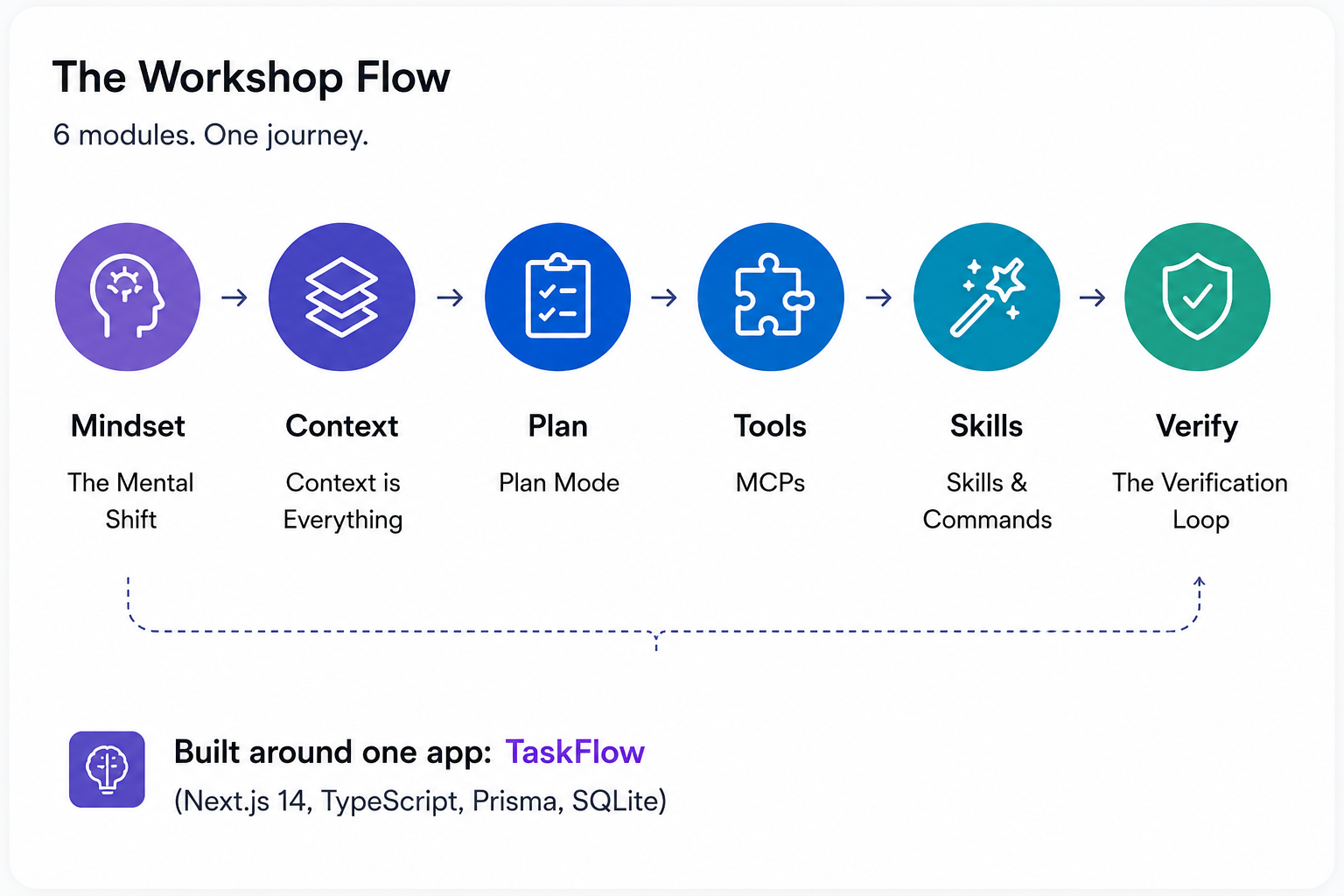
Module 1: The Mental Shift (20 min)
Why it goes first: If participants walk into the workshop thinking of AI as fancy autocomplete, nothing else sticks. The first module reframes their role: you're no longer a coder, you're a director. Your job is to ensure requirements clarity, architecture decisions, quality control, and code review. The AI writes the code. You direct the work.
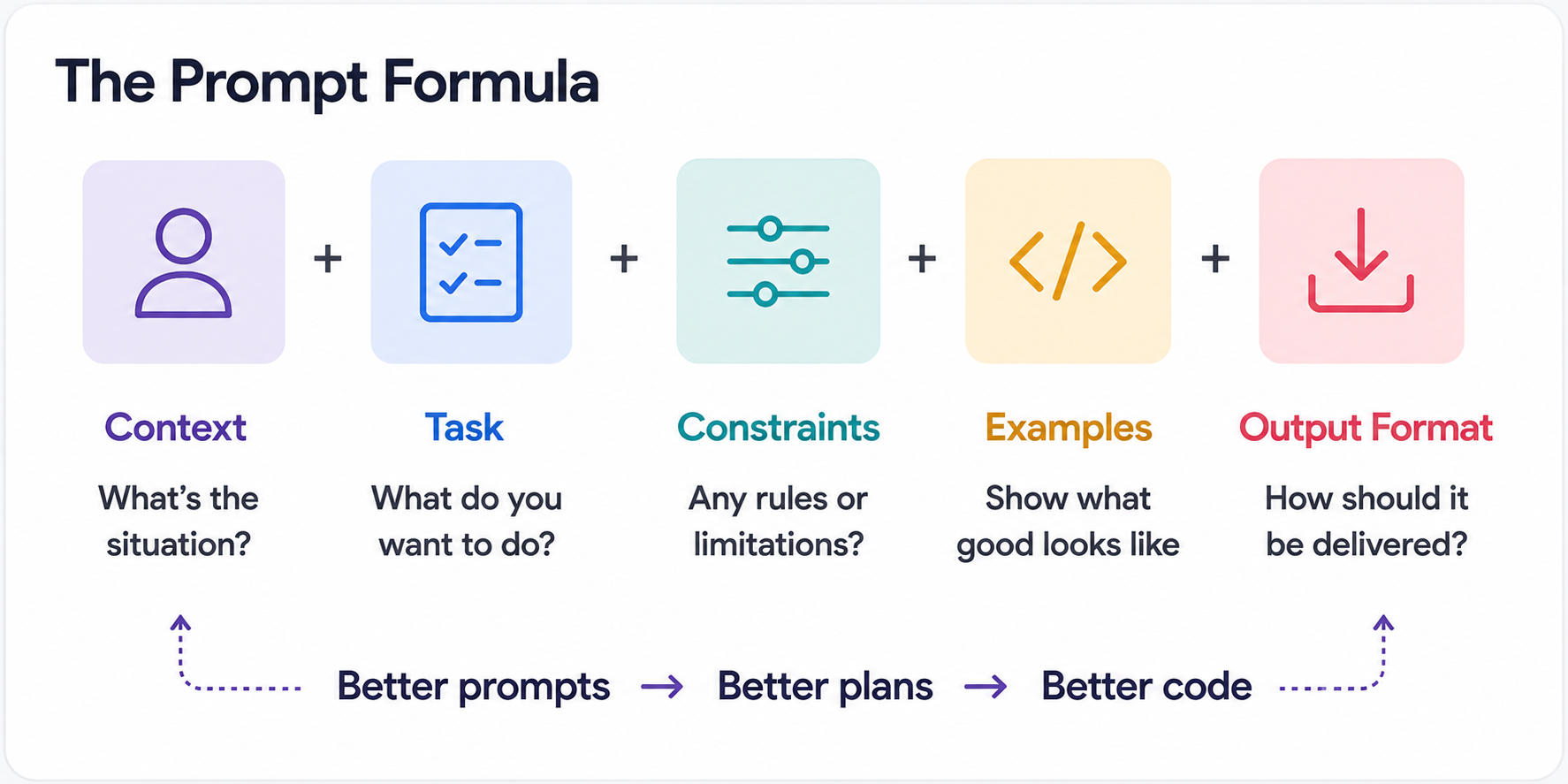
This module introduces the Prompt Formula—Context + Task + Constraints + Examples + Output Format—and immediately demonstrates the difference between a vague prompt ("add login") and a specific one with architectural context, technology constraints, and output expectations. The exercise has participants add a priority field to TaskFlow tasks using a well-structured prompt rather than writing the code themselves.
We tried putting context management first in an early outline. It didn't work. Without the mindset shift, participants treated context management as a technical trick rather than a fundamental change in how they work.
Module 2: Context is Everything (30 min)
Why, before Plan Mode: Context is the substrate that makes everything else work. Plan Mode produces bad plans without good context. MCPs provide context from external sources. Skills encode context into reusable workflows. Teaching context management second means every subsequent module benefits from it.
This module covers context windows (the AI's "working memory"), context rot (when irrelevant information accumulates and degrades output quality, symptoms include the AI repeating rejected suggestions, contradicting itself, or giving generic responses), strategic file inclusion (what to always include, sometimes include, and never include), and chunking (dividing large tasks into context-manageable pieces).
We teach 7 ways to provide context: the prompt itself, conversation history, project rules (.cursorrules / CLAUDE.md), attached files, Skills, MCPs, and agent memory. The exercise has participants practice structured context provision while adding categories to TaskFlow.
Module 3: Plan Mode (30 min)
Why third: Plan Mode is the first feature where the new mental model pays off. You describe what you want, the AI proposes a plan, you review and edit the plan, and then the AI executes. It's the "director" role in action. But it only works well if participants already understand how to provide context (Module 2) and have shifted their mental model (Module 1).
We teach when to use Plan Mode (tasks longer than 30 minutes, multi-file changes, unfamiliar code, architecture decisions) and, critically, how to read plans critically. Red flags in AI-generated plans include vague steps, unnecessary refactoring, and incorrect assumptions about the codebase. The exercise uses Plan Mode to add due dates with overdue highlighting to TaskFlow, a multi-file change that benefits from planning.
The stat we share: Plan Mode can reduce feature development time by 60% when used for the right tasks. We're careful to scope that claim, "appropriate tasks" means complex, multi-step work, not every one-line change.
Module 4: MCPs (30 min)
Why fourth: MCPs (Model Context Protocol) solve a problem participants now understand viscerally from Module 2; the AI's knowledge is static, but libraries and frameworks update constantly. MCPs are plugins that give the AI access to live documentation, external tools, and real-time data. After a 10-minute break, this module introduces the MCP ecosystem: Context7 (live documentation), Figma, Supabase, GitHub, Jira/Linear, and Pencil.
The exercise has participants configure Context7 in their editor and use it to add Markdown descriptions to TaskFlow tasks, pulling live library docs instead of relying on the AI's potentially outdated training data. We also cover security considerations: what data MCPs can access, permission models, and audit logging.
Module 5: Skills and Commands (30 min)
Why fifth, not earlier: Skills are expert knowledge encoded into reusable workflows. They're powerful, but they're also the feature with 0% adoption in our survey. Teaching them too early, before participants understand context, planning, and MCPs, would make them feel abstract. By Module 5, participants have enough foundation to understand why encoding a workflow matters.
We introduce the Superpowers Framework: core skills (brainstorming, writing plans, executing plans, TDD, systematic debugging, verification, code review), lifecycle skills (git worktrees, parallel agents, finishing branches, subagent-driven development), and meta skills (using superpowers, writing skills).
This module includes the research that influenced our design decisions:
- The AGENTS.md finding: Research on project configuration files showed that AI-generated
AGENTS.mdfiles provide marginal benefit. Curated, human-written configuration files provide substantially better results. This told us we needed to teach people to write these files themselves rather than generate them. - The Skills effectiveness finding: Similarly, curated Skills deliver measurable benefits, while AI-generated Skills yield negligible improvement. Quality of the encoded knowledge matters more than quantity.
- The Vercel study: Vercel's research found that
AGENTS.md-style project context outperformed Skills-based approaches because the model failed to invoke Skills correctly 56% of the time. This shaped our recommendation: invest heavily in project context files (CLAUDE.md,AGENTS.md), and use Skills selectively for well-defined, repeatable workflows.
The exercise has participants use a commit skill and explore the skill discovery workflow in their TaskFlow project.
Module 6: The Verification Loop (20 min)
Why last: Verification builds on everything. You need the mental model (Module 1) to understand why review matters. You need context management (Module 2) to understand what the AI might have missed. You need Plan Mode (Module 3) to understand how planning prevents issues upstream. Verification is the capstone that ties the workshop together.
This module opens with the mindset: "Think of AI as a junior developer, capable and fast, but without judgment." Then we tell the story that makes it concrete.
The Mathi Problem: One of our team members shipped a feature in half a day using AI. Then spent 3 days fixing the bugs it introduced. The feature was done fast. The code was not done well. This is the most common failure mode of AI-assisted development, and it's entirely preventable. (We cover this incident in depth in The Mathi Problem: Why AI-Generated Features Ship Fast and Break Slow.)
The module teaches Prevention over Verification, the idea that the best verification is not needing to verify as much:
CLAUDE.md/AGENTS.mdsetup (30 min investment, hours saved): Project context that prevents the AI from making wrong assumptions- Skills setup (15 min investment, consistent workflows): Encoded knowledge that ensures repeatable quality
- Plan Mode discipline (5 min per task, avoids scope creep): Planning before execution catches bad approaches before code is written
We also present sobering industry statistics: Veracode found that approximately 45% of AI-generated code contains security flaws, CodeRabbit measured 1.7x more defects in AI code than in human-written code, Jellyfish found that PRs are 18% larger with AI assistance, and Google's DORA report showed measurable decreases in delivery stability with AI adoption. But, and this is the critical pivot, those statistics come from teams without proper configuration. The entire workshop is about proper configuration. The tools aren't the problem. The absence of setup, process, and verification is the problem.
Bonus Track: Choosing the Right Model (10 min)
A brief closer on model tiering: not every task needs the smartest model. We teach a 3-tier framework (Flagship for planning and debugging, Mid-Range for daily coding, Fast for boilerplate) and the budget rule (20% / 60% / 20%). The guiding principle: "Plan with the best, execute with the rest."
Key Design Decisions
Beyond the module sequence, several structural decisions shaped the workshop.
"Director, not Coder" as the throughline. Every module reinforces this concept. Module 1 introduces it. Module 3 (Plan Mode) is in practice. Module 6 (Verification) is the director's role in quality control. We chose a single concept to anchor the entire workshop because workshops that try to convey 15 concepts dilute them all.
Exercise progression on a single codebase. Participants don't start a new project in each module. They extend TaskFlow from CRUD to a full-featured app with priority, categories, due dates, markdown descriptions, search, and an activity feed. This creates compound learning: the category filter you added in Module 2 serves as the context for the Plan Mode exercise in Module 3. It also mirrors real work, where you're always building on an existing codebase.
The Prompt Formula as a concrete tool. We didn't teach "write better prompts" as vague advice. We gave participants a formula: Context + Task + Constraints + Examples + Output Format. Every exercise uses it. By the end, it's muscle memory, not theory.
Research citations, not opinions. When we say curated Skills outperform AI-generated ones, we cite the research. When we say AGENTS.mdoutperforms Skills in certain contexts, we cite Vercel's study. When we present statistics on AI code quality, we cite the sources. This isn't a workshop built on vibes—it's built on evidence. That also means the workshop changes when the evidence changes.
Stack-specific, not generic. TaskFlow is a Next.js 14 application built with TypeScript, Prisma, and SQLite. Our team works in this stack. The exercises use this stack. The CLAUDE.mdexamples reference this stack. This is a deliberate trade-off (see below), but it means every exercise is directly transferable to participants' real projects the next day.
Trade-offs and What We'd Change
This is the section that separates an honest retrospective from a press release. Every design decision involved sacrificing something.
3 hours is not enough time. We cut aggressively to fit the format. The full self-paced course is 8-12 hours long for a reason — there's 4x more material than we could cover live. What got cut: deep dives into MCP security models, advanced Skills authoring, multi-agent workflows, git worktree strategies for parallel AI work, and any meaningful coverage of TDD with AI. Participants leave the workshop knowing these things exist, but not knowing how to use them. The Notion self-training materials cover what the workshop can't, but we know self-paced completion rates are low. This is our biggest unsolved tension.
One stack means limited universality. TaskFlow is a Next.js application. If your team works in Python, Go, or Rust, the exercises don't transfer directly. The concepts transfer, context management, Plan Mode, verification, but the muscle memory doesn't. To run this workshop for a different stack, you'd need to rebuild the demo app and all seven exercises. That's 2-3 days of work. We chose depth in one stack over breadth across many, but it limits who can use the workshop without modification.
Hands-on means slower coverage. Every module with an exercise takes 2-3 times longer than a lecture covering the same material. We could have covered 12 topics in a lecture-based format. We covered 6 with hands-on exercises. We believe the retention trade-off is worth it -- people remember what they do, not what they hear -- but it means the workshop's breadth is narrow by design.
No pair programming or collaborative exercises. Every exercise is individual. We considered pair programming formats (one person prompts, one reviews), but cut them for time. This means participants miss the collaborative review dynamic that's central to real AI-assisted development. A future version should address this.
The workshop doesn't cover when NOT to use AI. We teach how to use AI features well. We don't spend meaningful time identifying tasks where AI is the wrong tool—tasks requiring deep domain expertise, security-critical code paths that need manual review regardless, or creative architecture decisions where AI suggestions can anchor you to conventional approaches. We acknowledge this in Module 6, but don't dedicate a module to it.
We haven't run a formal facilitator retrospective yet, so we're being transparent about what we know and what we're still learning. The trade-offs listed above come from the design process, not from post-delivery data. As we run more cohorts — the workshop was mandatory for ~70 engineers and optional for the full company of ~100 people — we'll have richer data on what did and didn't land. We plan to publish a follow-up with those findings.
Results
We defined clear metrics with targets before running the workshop:
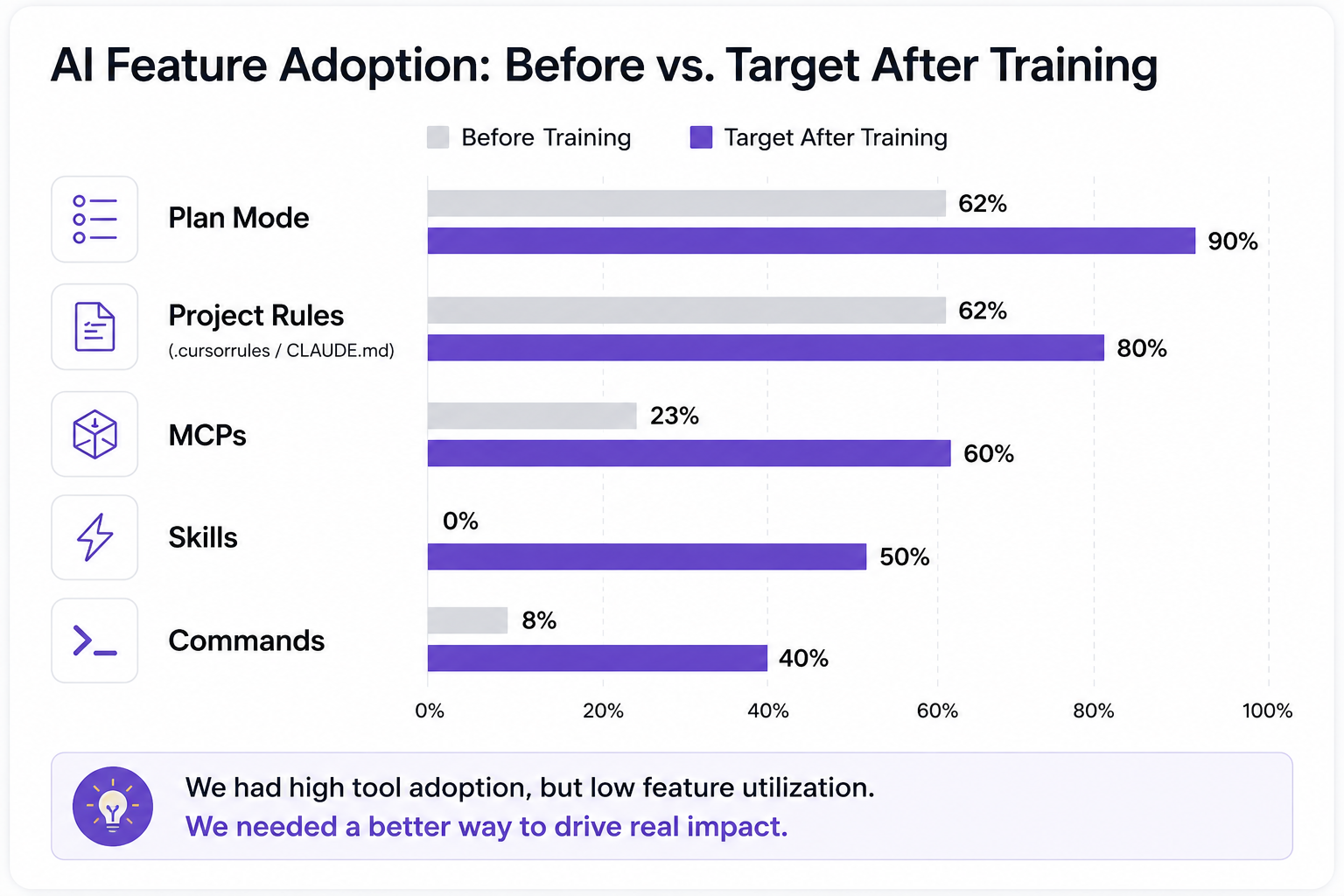
We also defined success metrics at three time horizons:
- Immediate (workshop completion): Every participant can write a structured prompt, has Context7 configured, and has used Plan Mode at least once
- Short-term (1 week): Plan Mode usage increases, at least 3 MCPs configured across the team
- Long-term (1 month): Skills usage above 0% (target 50%), reduced bug reports from AI-generated code
We're still collecting formal post-training data, but the early signals are encouraging. Claude Code adoption across the team is now ~91%. More telling than any single number: engineers now share skills, MCP configurations, and tips organically — in Slack channels, in PR comments, in team meetings. The conversation shifted from "should I use this?" to "here's what I built with this." The mandatory workshop reached ~70 engineers, with optional access for the full company of ~100 people.
We'll publish formal before/after comparison data once we run the follow-up survey. For now, the strongest evidence is cultural: the team talks about these tools differently than they did six months ago.
The one-week challenge we set for every participant: "Use Plan Mode for every task longer than 30 minutes." This creates a forcing function for the most impactful single behavior change from the workshop.
Steal This: The Workshop Outline
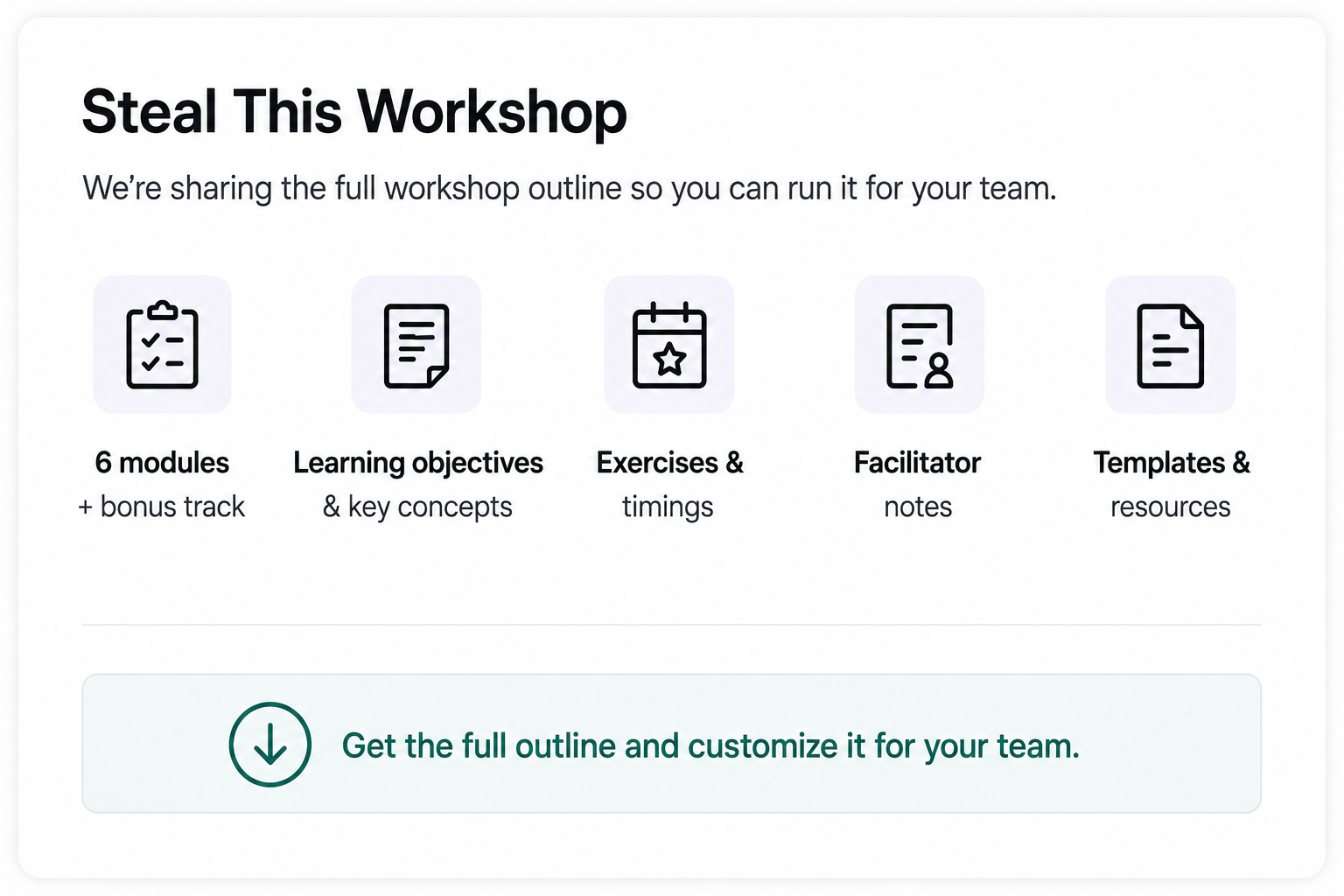
The workshop outline — all 6 modules plus the bonus track, with learning objectives, key concepts, exercise descriptions, and timing — is designed to be customized.
The outline is designed to be customized. The concepts are stack-agnostic even though our implementation uses Next.js. The template notes tell you what to swap out for different stacks, team sizes, and skill levels.
If you build on it, we'd genuinely like to hear what you changed and why. The training evolves, "try and change, don't expect to build a setup that works for years", and your adaptations could improve ours.
Further Reading
- The Feature Utilization Gap: What 85% AI Tool Adoption Really Looks Like, The data that led to building this workshop
- The Mathi Problem: Why AI-Generated Features Ship Fast and Break Slow, The full story behind Module 6's core anecdote
- AI Tools Are Not Just for Developers: How We're Expanding Beyond Engineering, What happened when we applied similar thinking to PMs, HR, and delivery
- Anthropic Skilljar: Claude Code in Action, External training resource we recommend as a supplement
- Anthropic Prompt Engineering Guide, Foundation for the Prompt Formula taught in Module 1
This article is part of our AI journey series. Published April 2026. The tools, features, and recommendations described here reflect the landscape as of that date. AI tooling moves fast—verify current capabilities before building on our specific tool recommendations.

