Development
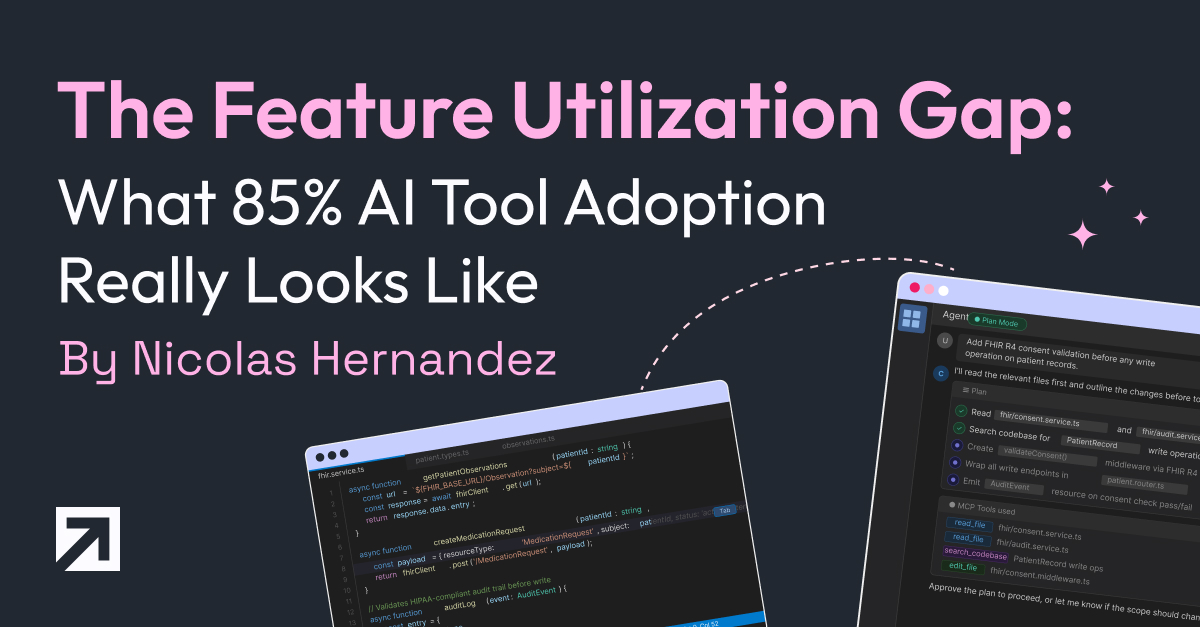
The Feature Utilization Gap: What 85% AI Tool Adoption Really Looks Like
This is the first article in a four-part series about how Xmartlabs went from organic AI tool adoption to a structured, cross-company program. The short version of the journey:
- We thought we were ahead. 85% of our engineers adopted Cursor on their own, no mandate, no rollout plan.
- A survey told us we were wrong. Tool adoption was high. Feature utilization was near zero. The gap was structural, not individual.
- That gap forced a response. We created a dedicated AI Engineering group, built a 3-hour hands-on training program called IA Level Up, and extended it beyond engineering to PMs, HR, delivery, and pre-sales.
This article covers the data — how we measured the gap, what we found, and how to run the same diagnostic on your own team. The rest of the series walks through what we did about it: the training program we designed, the most expensive AI debugging lesson we learned, and how we pushed these tools into non-technical roles.
The Survey
In early 2026, as part of forming our AI Engineering group, we ran an internal survey across our engineering team. The goal was straightforward: stop guessing how people use AI tools and start measuring it.
What We Asked
The survey covered six dimensions of AI-assisted development tooling:
- Tool adoption -- Do you use Cursor (or equivalent) in your daily work?
- Plan Mode -- Do you use Plan Mode to scope work before execution?
- Rules files -- Do you maintain
.cursorrules,CLAUDE.md, orAGENTS.mdfiles in your projects? - MCPs (Model Context Protocol) -- Do you use MCP integrations to connect AI tools to external services?
- Commands -- Do you use custom commands or slash commands in your workflow?
- Skills -- Do you use Skills (reusable, encoded expert workflows)?
Each question targeted a specific capability layer—from basic tool presence to advanced workflow automation. We weren't asking people to self-assess their skill level. We were asking binary usage questions: do you use this, yes or no.
Methodology and Limitations
We should be honest about what this survey is and isn't.
This was an internal survey of our engineering team at Xmartlabs -- a software consultancy with a culture of early technology adoption. The sample represents one company's engineering organization at one point in time. We didn't run a controlled study. We didn't track usage telemetry. We asked people what they use, and people sometimes overestimate their own tool usage.
The survey also captures a snapshot. AI tooling moves fast enough that the specific features we measured may look different by the time you read this. The categories matter more than the specific tool names.
What makes this data useful isn't statistical rigor—it's that we asked about feature depth, not tool presence. Most internal surveys stop at "Do you use the tool?" We went further.
The Data
Here are the raw numbers:
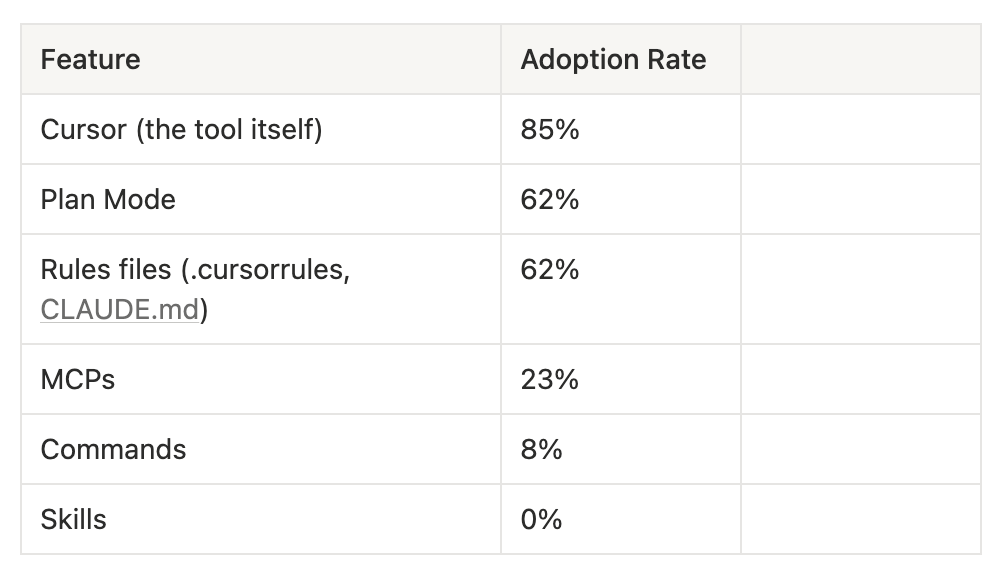
Read that last line again. Zero percent. Not low adoption -- zero.
The Utilization Funnel
The pattern becomes clearer when you visualize it as a funnel:
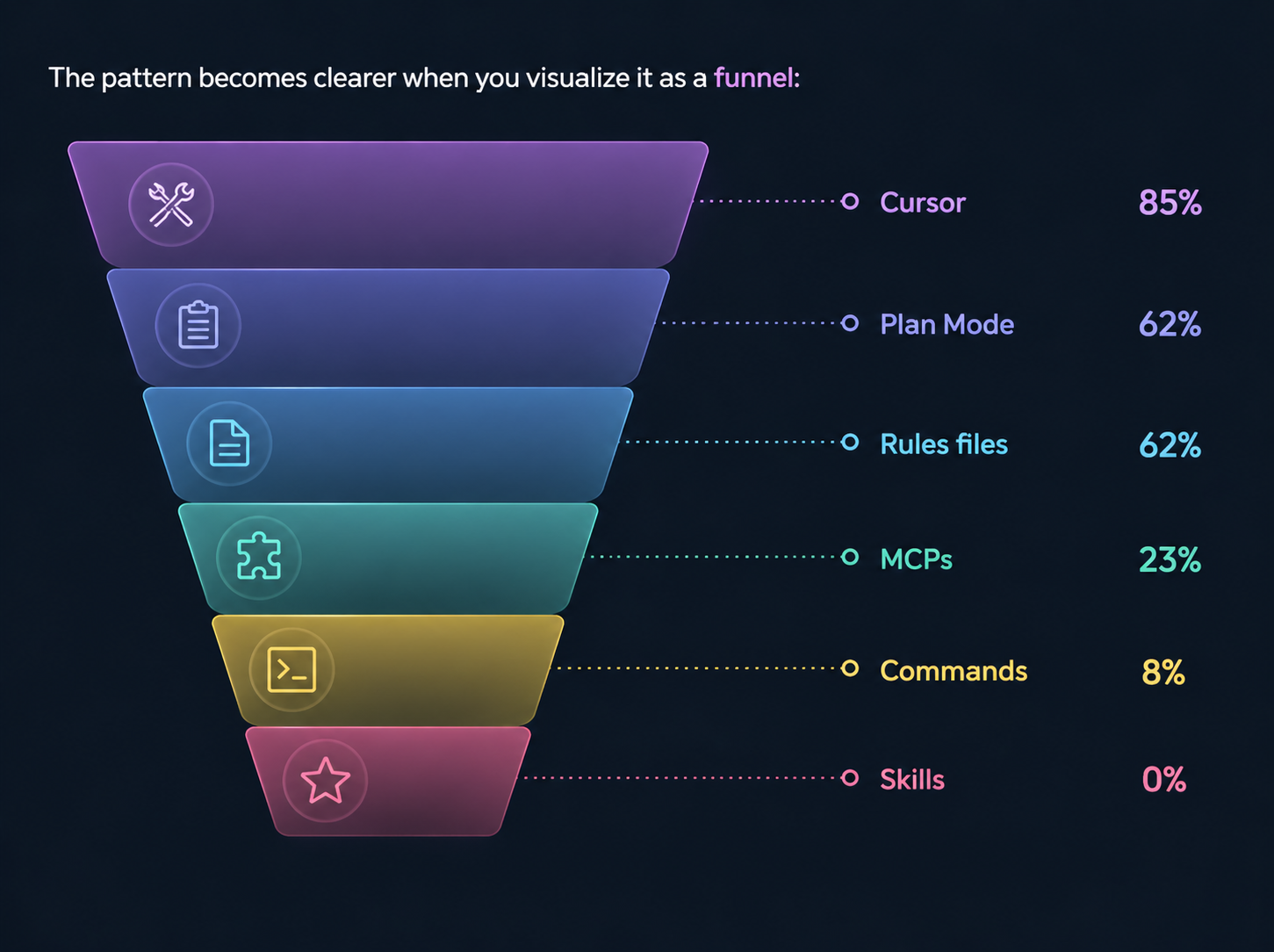
Each layer represents increasing sophistication in how someone uses AI-assisted development:
- Layer 1 -- Tool presence (85%): The tool is installed and used for basic tasks. Autocomplete, inline suggestions, and code questions.
- Layer 2 -- Guided execution (62%): The user structures their interaction. Plan Mode scopes work before execution. Rules files provide the AI with persistent context for the project.
- Layer 3 -- External integration (23%): The tool connects to the outside world. MCPs pull in live documentation, project management data, design specs, and database schemas.
- Layer 4 -- Custom automation (8%): The user has created reusable workflows. Commands encode common operations into repeatable shortcuts.
- Layer 5 -- Encoded expertise (0%): Expert knowledge is packaged into Skills that can be invoked by name -- complex, multi-step workflows that encode how a senior developer approaches specific problem types.
The drop from Layer 2 to Layer 3 is where the funnel collapses. Going from 62% to 23% represents the boundary between "using AI as a better text editor" and "using AI as a connected development partner."
What the Numbers Mean
At 85% tool adoption, we looked like an AI-forward engineering team. If you'd asked us whether we used AI tools, we'd have said yes with confidence. And we would have been telling the truth, but only a shallow version of it.
Most of our team used AI as a glorified autocomplete. Type a few characters, accept the suggestion, move on. That's useful. It's also about 20% of what these tools can do.
The features that compound -- the ones that turn AI from a typing assistant into an architectural collaborator -- sat unused. Plan Mode was used by 62% of the team. That sounds decent until you realize it's where AI-assisted development transitions from reactive (the AI responds to what you type) to proactive (the AI helps you think before you build). The 38% who weren't using it skipped the planning step entirely.
MCPs were worse. Only 23% connected their AI tools to external data sources, such as live documentation, project management systems, and design tools. Without MCPs, the AI operates on stale training data and whatever files are open in the editor.
And Skills -- the ability to encode expert workflows into reusable, invocable patterns -- had zero adoption. Not low. Zero.
Introducing the Feature Utilization Gap
We started calling this the feature utilization gap: the difference between the percentage of a team that has adopted a tool and the percentage that uses its advanced capabilities.
It's a useful concept because it reframes the adoption question. Most engineering leaders measure tool adoption as a binary: does the team use it or not? That metric is misleading. A team at 85% Cursor adoption and 0% Skills usage isn't an AI-adopting team. It's a team that adopted the easy parts and missed the leverage.
The feature utilization gap is not specific to AI tools, but AI tools make it especially visible because the capability gap between basic and advanced features is large. The difference between autocomplete and a properly configured Skill with MCP integrations and Plan Mode discipline is not incremental—it's a different way of working.
We define the gap as:
Feature Utilization Gap = Tool Adoption Rate - Advanced Feature Adoption Rate
For us, on Skills: 85% - 0% = 85 percentage points. On MCPs: 85% - 23% = 62 percentage points.
A healthy team might have a 20-30-point gap (some lag in advanced adoption is natural). A gap above 50 points signals a structural problem -- the team adopted the tool but missed the paradigm shift it enables.
Industry data confirms this isn't unique to us. A Jellyfish study of 20 million pull requests found that only 44% of companies had even tried autonomous AI agents, and those agents accounted for less than 0.2% of merged PRs. Stack Overflow's 2025 survey showed 80% of developers use AI tools, but only 52% say agents have affected how they work. The gap between "has the tool" and "uses the tool deeply" is a widespread industry pattern.
Why This Happens
The gap isn't about laziness or resistance. Our team actively chose to adopt Cursor—they were enthusiastic. The problem is structural.
Advanced features require setup
Basic Cursor usage requires nothing beyond installation. Open the editor, start typing, accept suggestions. MCPs require configuration: set up a server, configure authentication, and define which external tools the AI can access. Skills require authoring - you need to write the workflow, test it, and iterate on it. The activation energy for each layer increases significantly.
In our survey data, you can see this directly: the adoption rate drops in proportion to setup complexity.
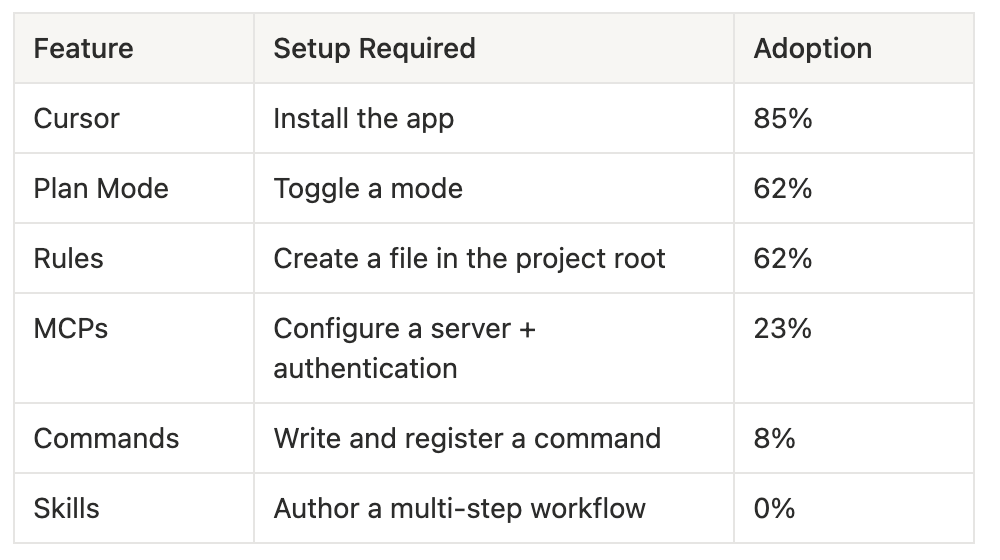
This isn't a coincidence. Each step adds friction, and friction compounds.
Advanced features require a mental model shift
Using Plan Mode well means changing how you think about development. Instead of "let me write this function," you think "let me describe what I need and review the AI's implementation plan before any code is written." That's a different cognitive pattern. Without someone showing you why that shift matters and what it looks like in practice, Plan Mode feels like an unnecessary extra step.
The same applies to MCPs. Connecting your AI tool to Linear, Notion, or Context7 only makes sense once you understand that the AI's effectiveness is directly proportional to the context it has access to. That's not obvious if you've been treating the tool as autocomplete.
Nobody teaches the advanced path
AI tool vendors ship features and write documentation. But they don't provide the connective tissue—the "here's how Plan Mode, MCPs, and Skills work together to change your workflow" narrative. Setup guides are per-feature, not per-workflow. Individual engineers are expected to connect the dots on their own, and most don't.
Organic adoption works for the easy layers because the value is self-evident. You install Cursor, it autocompletes, and you see the benefit immediately. Advanced features require someone to explain their value before they're visible and to provide the setup path to make them accessible.
What We Did About It
The survey data was the catalyst for the creation of a dedicated AI Engineering group at Xmartlabs. The group's first major output was IA Level Up — a structured training program designed to systematically close the feature utilization gap, building capabilities layer by layer in the order the funnel reveals them. Context management and Plan Mode before MCPs. MCPs before Skills. Verification is the capstone.
We set concrete targets based on the survey baseline:
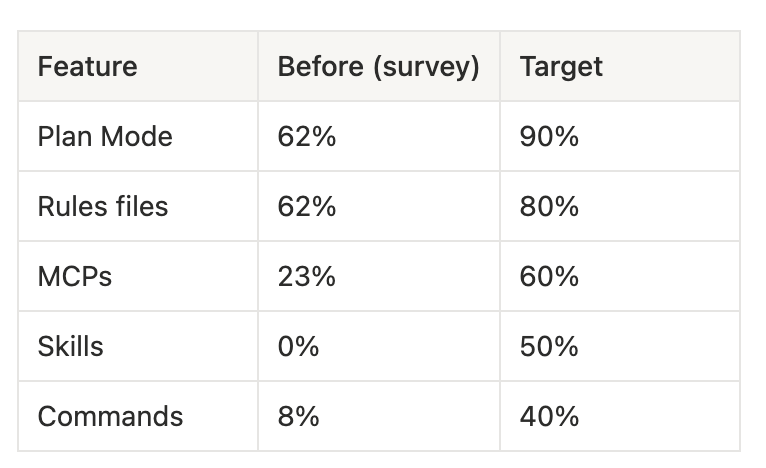
As of April 2026, we don't have a formal post-training survey yet. What we do have is observable change: Claude Code adoption across the team is now at ~91%. Engineers share skills, MCP configurations, and workflow tips in Slack daily — something that didn't happen before. The conversations shifted from "what is this tool?" to "here's what I built with it this week." The culture moved. We'll run a formal follow-up survey to get hard numbers, but the qualitative signal is strong.
The full design of the IA Level Up program -- what we chose, what we rejected, and why we sequenced the modules the way we did -- is covered in Designing IA Level Up: A 3-Hour Workshop That Changed How Our Team Uses AI.
How to Measure This in Your Team
You don't need our exact survey. You need the principle: measure feature depth, not tool presence.
Here's a concrete approach you can run this week:
Step 1: Map Your Tool's Feature Layers
Before you survey anyone, identify the capability layers for whatever AI tool your team uses. The layers should follow increasing sophistication:
- Presence -- Is the tool installed and used at all?
- Configuration -- Has the user customized the tool for their workflow? (rules files, settings, preferences)
- Structured interaction -- Does the user plan before executing? (Plan Mode, multi-step prompting)
- External integration -- Is the tool connected to external data sources? (MCPs, plugins, API integrations)
- Custom automation -- Has the user created reusable workflows? (commands, scripts, shortcuts)
- Encoded expertise -- Are complex workflows packaged as invocable patterns? (Skills, custom agents)
Step 2: Survey for Binary Usage
Ask yes/no questions for each layer. Don't ask people to rate their proficiency—this introduces bias. Ask: "Do you use [feature] in your daily/weekly work?"
Keep the survey short. Six to ten questions. If it takes more than three minutes, completion rates drop.
Step 3: Build Your Funnel
Plot the adoption percentages by layer. The shape of your funnel tells you where the gap is:
- Gradual decline (80% → 70% → 55% → 40% → 30% → 20%): Healthy. Natural lag in advanced feature adoption, no structural problem.
- Cliff drop (85% → 62% → 62% → 23% → 8% → 0%): This was us. A sharp boundary where the team stops advancing. Everything below the cliff needs intervention.
- Flat low (85% → 20% → 15% → 12% → 10% → 5%): The team adopted the tool, but nothing else was done. Either the tool is being used as a simple replacement for an older tool, or the more advanced features don't fit the team's workflow.
Step 4: Identify the Cliff
The most actionable insight is where the cliff is. For us, it was between Layer 2 (Rules, 62%) and Layer 3 (MCPs, 23%). That told us the intervention needed to focus on the transition from "configuring the tool" to "connecting the tool to external systems." That's exactly what our training program focuses on.
Step 5: Intervene Structurally
Once you know where the cliff is, you can design targeted interventions instead of generic "AI upskilling" programs. If the cliff is between Presence and Configuration, your team needs help with initial setup. If it's between Structured Interaction and External Integration (like ours), they need hands-on walkthroughs of MCP configuration and use cases.
The key insight: don't try to move people from Layer 1 to Layer 6 in one push. Move them one layer at a time. Our training follows this progression deliberately.
The survey approach described above — binary usage questions across capability layers — is something you can adapt and run with your team this week. The key is measuring depth, not presence.
What's Next in This Series
Measuring the gap was the easy part. Closing it is where the real work starts. The next three articles cover what we did about it:
- Designing IA Level Up: A 3-Hour Workshop That Changed How Our Team Uses AI — the training program we built to close the gap, module by module, with the logic behind every design decision and what we'd change.
- The Mathi Problem: Why AI-Generated Features Ship Fast and Break Slow — a real postmortem. One of our engineers shipped a feature in half a day with AI, then spent three days fixing the bugs it introduced. Here's the prevention framework that came out of it.
- AI Tools Are Not Just for Developers: How We're Expanding Beyond Engineering — the same approach, applied to PMs, HR, delivery, and pre-sales. What worked, what didn't, and the playbook we're using.
Subscribe or follow along to get the rest as they drop. If you're running this diagnostic on your own team and want to compare notes, we'd like to hear what you find.
Data reflects our team's state as of early 2026. AI tooling evolves rapidly — the specific features and adoption rates described here are a snapshot, but the framework for measuring utilization depth applies regardless of which tools your team uses.