
Part of the Xmartlabs AI Journey series. Previously: Designing IA Level Up.
TL;DR
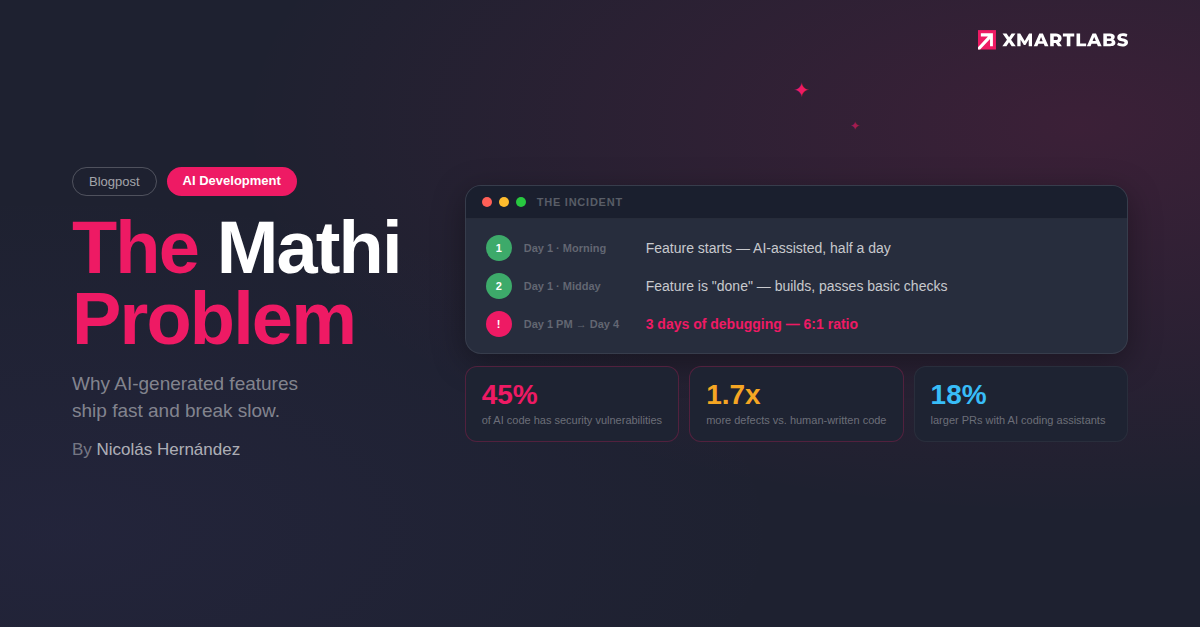
One of our team members shipped a feature in half a day using AI-assisted development. Then, I spent three days fixing the bugs it introduced. This is not an outlier; it is the most common failure mode of AI-assisted development. The good news is that it is entirely preventable. This post breaks down what happened, why the industry data is alarming, and the concrete prevention framework we now apply to every AI-assisted task.
The Incident
Summary
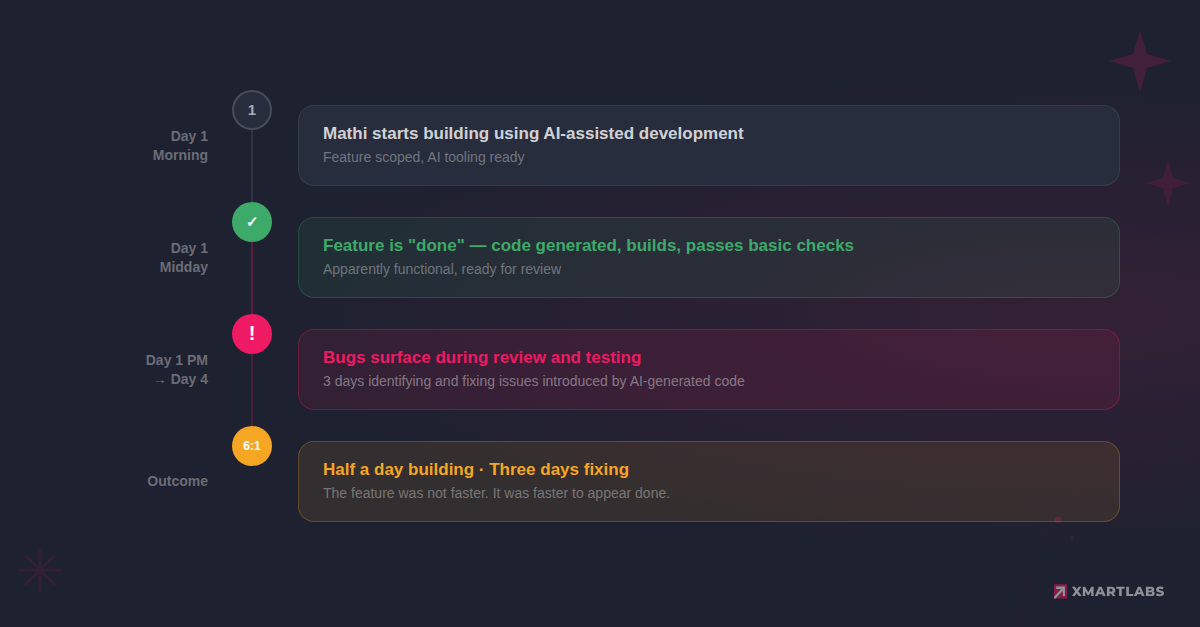
A developer on our team (Mathi) used AI tooling to implement a feature. The AI-generated working code fast. By midday, the feature was done: implemented, apparently functional, ready for review. What followed was three days of debugging, subtle bugs, edge cases the AI had not considered, and logic errors that only surfaced under real conditions.
Timeline
What happened
The AI did what it was asked to do. It produced code that compiled, ran, and appeared to work for the primary use case. But it lacked understanding of the broader system context: edge cases, existing patterns, and implicit requirements that an experienced developer would have internalized.
This is not a story about blame. Mathi did nothing wrong; this is what happens when a capable tool meets a workflow that was not designed for it. The AI wrote code the way a confident but inexperienced engineer would: quickly, plausibly, and without the judgment that comes from maintaining a codebase over months.
The ratio tells the story: half a day building, three days fixing. A 6:1 ratio of debugging to development. The feature was not faster. It was faster to appear done.
Why This Keeps Happening
Our experience is not unique. The industry data on AI-generated code quality is sobering:
- ~45% of AI-generated code contains security vulnerabilities. Veracode's 2025 GenAI Code Security Report tested 100+ LLMs across 80 code completion tasks and found that AI models chose the insecure coding path 45% of the time.
- 1.7x more defects in AI-generated code compared to human-written code. CodeRabbit's analysis of 470 open-source PRs found that AI-authored code averaged 10.83 issues per PR, compared with 6.45 for human-only code.
- Pull requests are 18% larger when developers use AI coding assistants, according to a Jellyfish study tracking millions of PRs across 500+ companies.
- Delivery stability decreases measurably with AI adoption. Google's DORA 2024 report found that a 25% increase in AI adoption was associated with a 7.2% decrease in delivery stability, and its 2025 follow-up confirmed the trend hasn't reversed.
These numbers paint a grim picture. If you stopped reading here, you would conclude that AI coding assistants make things worse, not better.
The "But" That Changes Everything
Here is the critical detail that most coverage of these statistics omits: these numbers come from teams using AI tools without proper configuration.
No project-level instructions. No verification workflows. No constraints on what the AI should or should not do. No structured review process for AI-generated output.
In other words, these teams gave an eager but inexperienced assistant the keys to the codebase and said, "Go.” No onboarding, no guardrails, no code review process adapted for AI output.
That is the environment that produces a 1.7x defect rate. That is the environment where incidents spike. And that was, honestly, the environment we were operating in when the Mathi Problem happened.
The question is not "should we use AI for coding?", that ship has sailed. The question is: how do we configure the environment so AI-generated code meets the same standards as human-written code?
The Root Cause
During our IA Level Up training program, we landed on a mental model that reframed everything:
Think of AI as a junior developer, fast, capable, and without judgment.
This is not dismissive. Junior developers are valuable. They learn fast, produce volume, and, given the right mentorship and review process, ship good work. But nobody gives a junior developer unsupervised access to production on their first week.
The problem with the Mathi Problem was not that AI wrote bad code. The problem was that the AI operated without:
- Project context: It did not know our conventions, architectural patterns, or existing abstractions.
- Constraints: It was not told what not to do. It did not know our testing requirements, our security considerations, or our deployment patterns.
- A review framework: The code review process was optimized for human-authored code, not for the specific failure modes of AI-generated code.
The root cause was not AI. It was the absence of a verification and prevention framework adapted to how AI writes code.
Prevention > Verification
After the Mathi Problem, we developed a principle that now drives how we work with AI: prevention is more valuable than verification.
Verification means catching bugs after they are written. Prevention means configuring the environment so the AI writes fewer bugs in the first place. Both matter, but prevention has a dramatically better return on time invested.
Here is the concrete framework we use, with real-time investments:
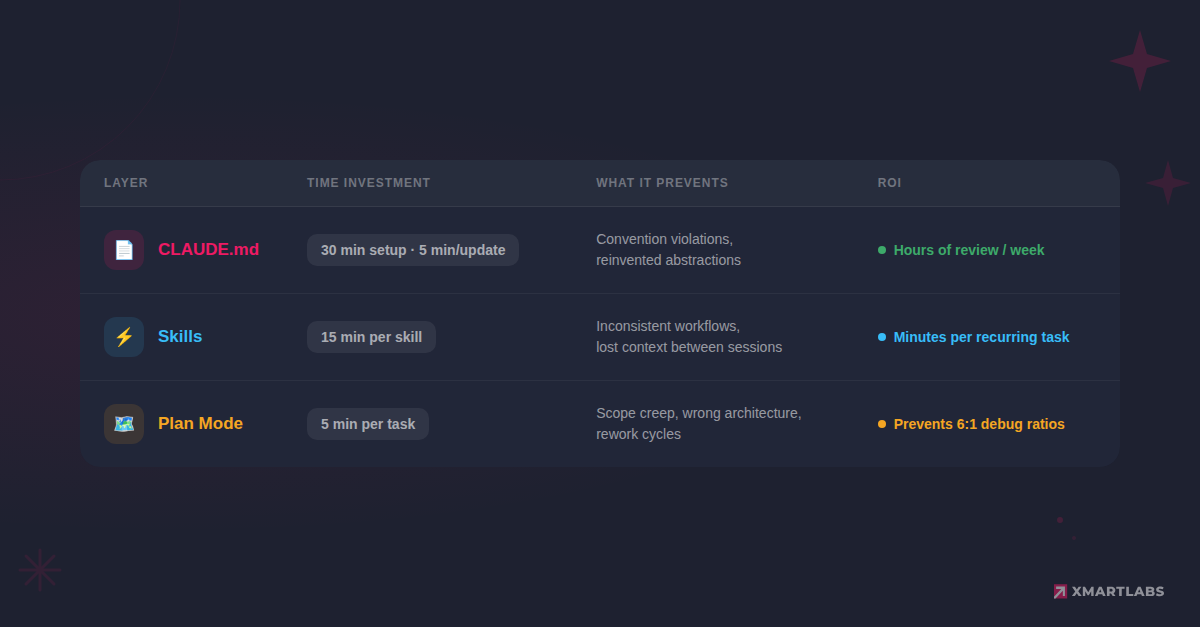
1. CLAUDE.md / AGENTS.md; 30 Minutes Setup, Hours Saved
The single highest-leverage action you can take is writing a project instruction file. In Claude Code, this is CLAUDE.md. In Cursor, it is .cursorrules or similar. The name varies by tool, but the concept does not.
This file tells the AI how your project works before it writes a single line of code. It is the equivalent of the onboarding document you give a new team member: here is how we structure things, here is how to run tests, here are the patterns we follow, here are the mistakes people make.
Time investment: 30 minutes to create, 5 minutes to update as the project evolves.
What it prevents:
- Code that ignores your existing abstractions (the AI reinvents utilities you already have)
- Test files in the wrong location or with the wrong framework
- Import patterns that violate your conventions
- Architecture decisions that contradict your system design
Anthropic's CLAUDE.md best practices guide is a good starting point. Your file should cover at minimum: project overview, how to run tests, code conventions, and known gotchas, based on your actual project, not a generic template.
The research supports this approach. Studies on project instruction files consistently show that curated, human-written instructions yield substantial benefits, whereas AI-generated instructions offer negligible improvement. McKinsey's 2026 research found that 57% of top-performing organizations invested in hands-on AI workshops and coaching versus only 20% of bottom performers — the gap is about intentional setup, not just having the tools. The investment of writing project instructions yourself, based on actual project knowledge, is what makes them work.
2. Skills Setup: 15 Minutes, Consistent Workflows
Skills are reusable workflow definitions that encode expert knowledge into repeatable processes. Instead of re-explaining your testing approach, deployment steps, or code review criteria in every conversation, define them once and refer to them by name.
Time investment: 15 minutes per skill, most projects need 3-5.
What it prevents:
- Inconsistent approaches to recurring tasks (one conversation uses Vitest, the next switches to Jest)
- Lost context between sessions (the AI "forgets" your testing patterns)
- Scope creep on routine tasks (the AI adds features you did not ask for)
However, a caveat: our internal data showed that 0% of our team was using Skills before our training program. And research from Vercel found that models fail to invoke Skills approximately 56% of the time; AGENTS.md-style project context consistently outperformed Skills-based approaches in their testing. Skills are powerful but require deliberate setup and team education to be effective. They are not a plug-and-play solution.
3. Plan Mode — 5 Minutes Per Task, Avoid Scope Creep
Plan Mode forces a two-step workflow: first, the AI proposes a plan; then, only after you review and approve, it executes.
Time investment: 5 minutes per task to review the plan before execution.
What it prevents:
- The AI modified files you did not intend it to touch
- Scope creep (it "helpfully" refactors adjacent code)
- Architectural decisions made implicitly during implementation
- The scenario where you realize 30 minutes into execution that the approach is wrong
This is the tool that directly addresses the Mathi Problem. If the plan had been reviewed before execution, the structural issues in the AI-generated feature would have been visible before a single line of code was written.
Our training data suggests Plan Mode can reduce feature development time by 60%, not because it writes code faster, but because it eliminates the rework cycle. Before our training program, only 62% of our team used Plan Mode. We set a target of 90%. We haven't yet run the formal follow-up survey, but anecdotally, Plan Mode has become the default for multi-file changes across most teams.
The Prevention Stack in Practice
The Verification Loop
Prevention reduces the frequency of bugs. Verification catches the ones that get through. Both are necessary.
After the Mathi Problem, we built a systematic verification process for AI-generated code. This is not a replacement for standard code review: it is an additional layer that targets the specific failure patterns of AI output.
Here is the verification framework we use:
Step 1: Boundary Check
Before reviewing the code itself, verify that the AI stayed within scope.
- Did it modify only the files you expected?
- Did it add dependencies you did not request?
- Is the PR size proportional to the task? (Remember: AI-assisted PRs tend to be 18% larger; some of that is unnecessary.)
Step 2: Security Scan
AI-generated code has a disproportionately high rate of security vulnerabilities. Check for:
- Hardcoded credentials or secrets
- Missing input validation
- SQL injection or XSS vectors
- Overly permissive access controls
- Dependencies with known vulnerabilities
This is not paranoia. When the data says ~45% of AI code contains security flaws, a dedicated security pass is not optional.
Step 3: Logic Review
The AI often produces code that works for the happy path but fails on edge cases. Focus on:
- Null/undefined handling
- Empty collections and boundary conditions
- Error paths and exception handling
- Race conditions in async code
- Off-by-one errors (a classic, and AI is not immune)
Step 4: Test Audit
Check that the tests actually test the right things:
- Do tests cover edge cases, or only the happy path?
- Are assertions meaningful? (AI sometimes writes tests that always pass.)
- Do tests use the project's testing patterns and utilities?
- Is the test-to-code ratio reasonable?
Step 5: Pattern Conformance
Verify the code follows your project's established patterns:
- Does it use your existing abstractions or reinvent them?
- Does it follow your naming conventions?
- Does the error handling match your project's approach?
- Are the imports organized the way your team expects?
This is where a well-written CLAUDE.md pays dividends; if the AI has the right instructions, pattern-conformance issues should be rare. If they are frequent, your project instruction file needs to be updated.
Step 6: Integration Check
Verify the code works within the broader system:
- Does it handle the data contracts correctly (API schemas, database types)?
- Does it interact correctly with adjacent services?
- Are there side effects that the AI might not have anticipated?
Results
Before the Prevention Framework
The Mathi Problem was our wake-up call, but it was not an isolated incident. Before we implemented structured prevention:
- AI-generated features had an unpredictable debugging tail
- Code reviews caught issues late in the process
- Developers treated AI output with the same trust level as their own code
- There was no systematic approach to AI-specific failure modes
After
Once we rolled out the Prevention > Verification framework through our IA Level Up training:
- Every project has a CLAUDE.md file, written by the team, updated as the project evolves
- Plan Mode is the default for any task that touches more than one file
- The Verification Loop checklist is part of our PR review process
- AI-generated code is treated as what it is: output from a fast, capable tool that lacks project context and judgment
We don't have clean before/after metrics yet; measuring code quality across an entire team is harder than measuring tool adoption. What we can say: teams that adopted the full prevention stack (CLAUDE.md + Plan Mode + verification checklist) report fewer surprise debugging sessions. The "half-day feature, three-day fix" pattern has become a cautionary tale the team references, not a recurring experience. We've also observed an increase in the number of PRs being shipped across projects, suggesting the framework isn't slowing teams down; it's giving them confidence to move faster.
The shift is not about using AI less. We use it more than ever. The shift is about using it within a framework that matches the tool's strengths (speed, volume, pattern implementation) while compensating for its weaknesses (judgment, context, edge case awareness).
What You Can Do Today
If the Mathi Problem resonates, if you have seen the half-day feature that becomes a three-day debugging session, here is where to start:
This afternoon (30 minutes):
Write a CLAUDE.md for your current project. Start with your project overview, how to run tests, code conventions, and known gotchas. Anthropic's CLAUDE.md best practices guide is a good reference.
This week (1 hour):
Create 2-3 Skills for your most common workflows (testing, PR preparation, code review). Enable Plan Mode as your default for multi-file changes.
This month:
Adopt a verification loop in your PR review process: boundary check, security scan, logic review, test audit, pattern conformance, and integration check. Track how many issues it catches. Refine your CLAUDE.md based on patterns you see.
The tools are not the problem. The absence of a configured environment is. Prevention is a one-time investment with compounding returns.
Further Reading
- The Feature Utilization Gap: What 85% AI Tool Adoption Really Looks Like, The data that led to building this workshop
- The Mathi Problem: Why AI-Generated Features Ship Fast and Break Slow, The full story behind Module 6's core anecdote
- AI Tools Are Not Just for Developers: How We're Expanding Beyond Engineering, What happened when we applied similar thinking to PMs, HR, and delivery
- Anthropic Skilljar: Claude Code in Action, an external training resource we recommend as a supplement
- Anthropic Prompt Engineering Guide, Foundation for the Prompt Formula, taught in Module 1
This article is part of our AI journey series. Published April 2026. The tools, features, and recommendations described here reflect the landscape as of that date. AI tooling moves fast; verify current capabilities before building on our specific tool recommendations.