

Most companies limit AI tools to their engineering teams. We decided to push them to project managers, HR, delivery, and pre-sales. The PM rollout is the furthest along, with five workflows built and in active use. The other roles are still early experiments. Here's the strategic reasoning, the concrete playbook we used, and an honest account of where we are today.
The Strategic Decision
After building IA Level Up and measuring the feature utilization gap across our engineering team, a question kept surfacing in our AI Engineering group meetings: if we only optimize developers, what happens to the rest of the pipeline?
A feature doesn't start with code. It starts with a PRD. It gets planned in a sprint. It gets communicated to stakeholders. It gets estimated in pre-sales. It gets staffed in delivery. Every one of those steps involves a person doing structured, repetitive work, the exact kind of work that AI tools handle well.
The logic was straightforward. The same agent that writes functions from a spec can write tickets from a PRD. The same MCP that connects to a GitHub repository can connect to Linear, Notion, or Google Calendar. The same skill that automates a test suite can automate a weekly status report.
We weren't trying to make everyone a developer. We were recognizing that the underlying capabilities- reading documents, extracting structured information, connecting to APIs, following multi-step workflows- are role-agnostic. The tool is a developer tool by default. The capabilities are not.
The risk was obvious: non-technical roles don't live in the terminal. The onboarding would be different. The resistance would be different. The way you measure value would be different. We decided to run a proof of concept with project managers first, then expand based on what we learned.
The Playbook
Before targeting a role, we needed a framework that would keep us from guessing. We settled on four evaluation criteria:
1. Task repetitiveness. How much of the role involves doing the same structured task weekly or daily? PMs write reports every Friday. Delivery tracks hours and utilization. HR processes candidate pipelines. High repetitiveness means high automation potential.
2. Tool accessibility. Does the role already use tools that have MCP integrations available? If a PM lives in Linear, Notion, and Google Calendar, and MCPs exist for all three, the integration surface is ready. If a role depends on a proprietary internal tool with no API, the barrier is higher.
3. Time savings potential. What's the realistic time reclaimed per week if the top 3-5 repetitive tasks are automated? We estimated this before building anything, using simple time logs from the people in each role.
4. Willingness to experiment. This one matters more than you'd think. A role with high automation potential but low interest will stall. We started with PMs because several of them had already expressed curiosity about what the engineering team was doing with Claude Code.
For each role, we followed the same implementation sequence:
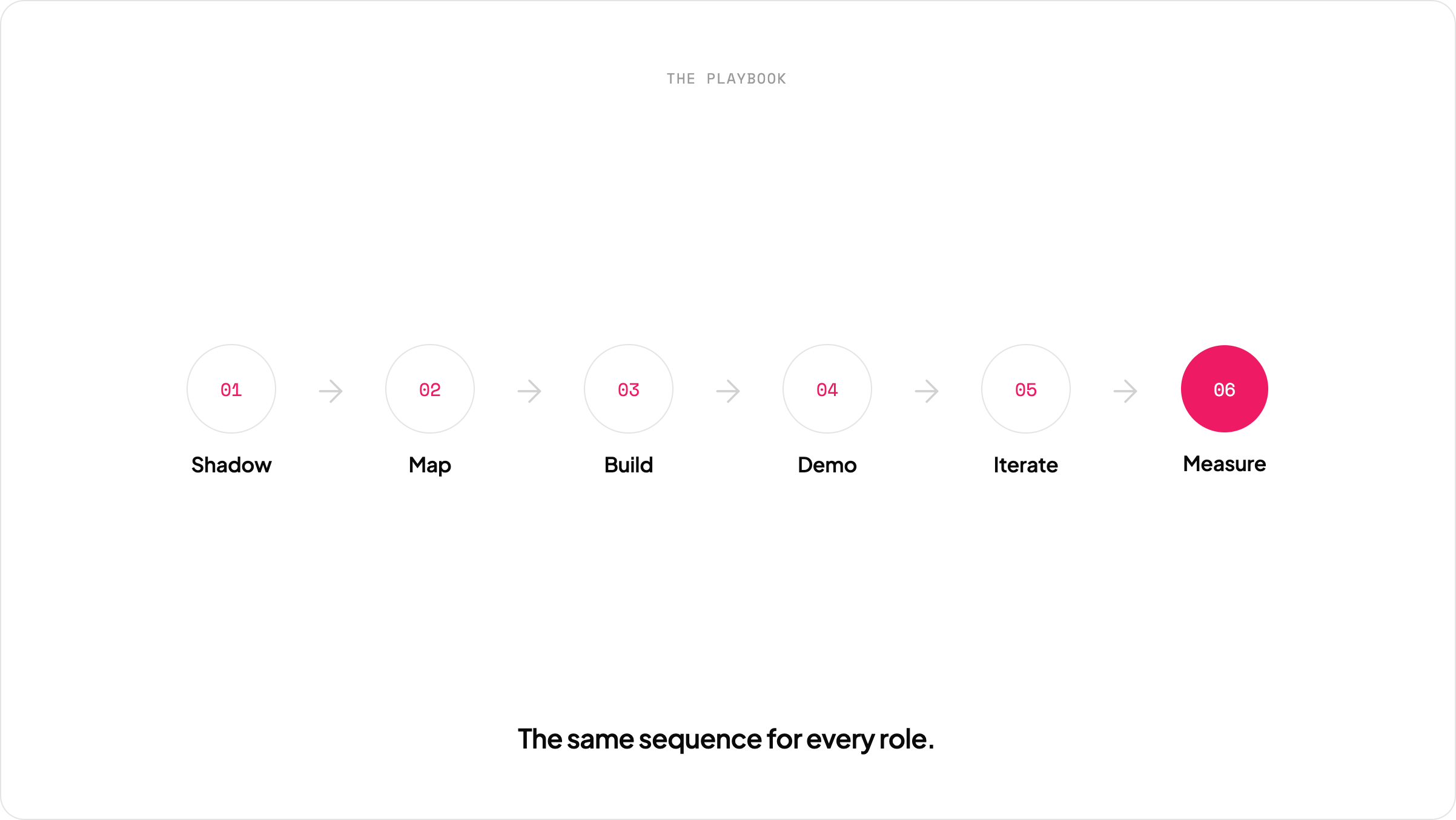
- Shadow: Observe the person doing their actual work for a week. Document every task, tool used, and time spent.
- Map: Identify which tasks are candidates for automation. Match them to available MCPs and skills.
- Build: Create the MCP configurations and custom skills needed for the top 3 workflows.
- Demo: Run a live session showing the workflows end to end. Let the person drive.
- Iterate: Adjust based on feedback. Some workflows need more guardrails. Some need fewer steps. Some don't survive contact with reality.
- Measure: Track actual time savings after two weeks. Compare against the pre-automation baseline.
This is the same playbook we're applying to every role we expand into. The specifics change. The structure doesn't.
PMs: The Proof of Concept
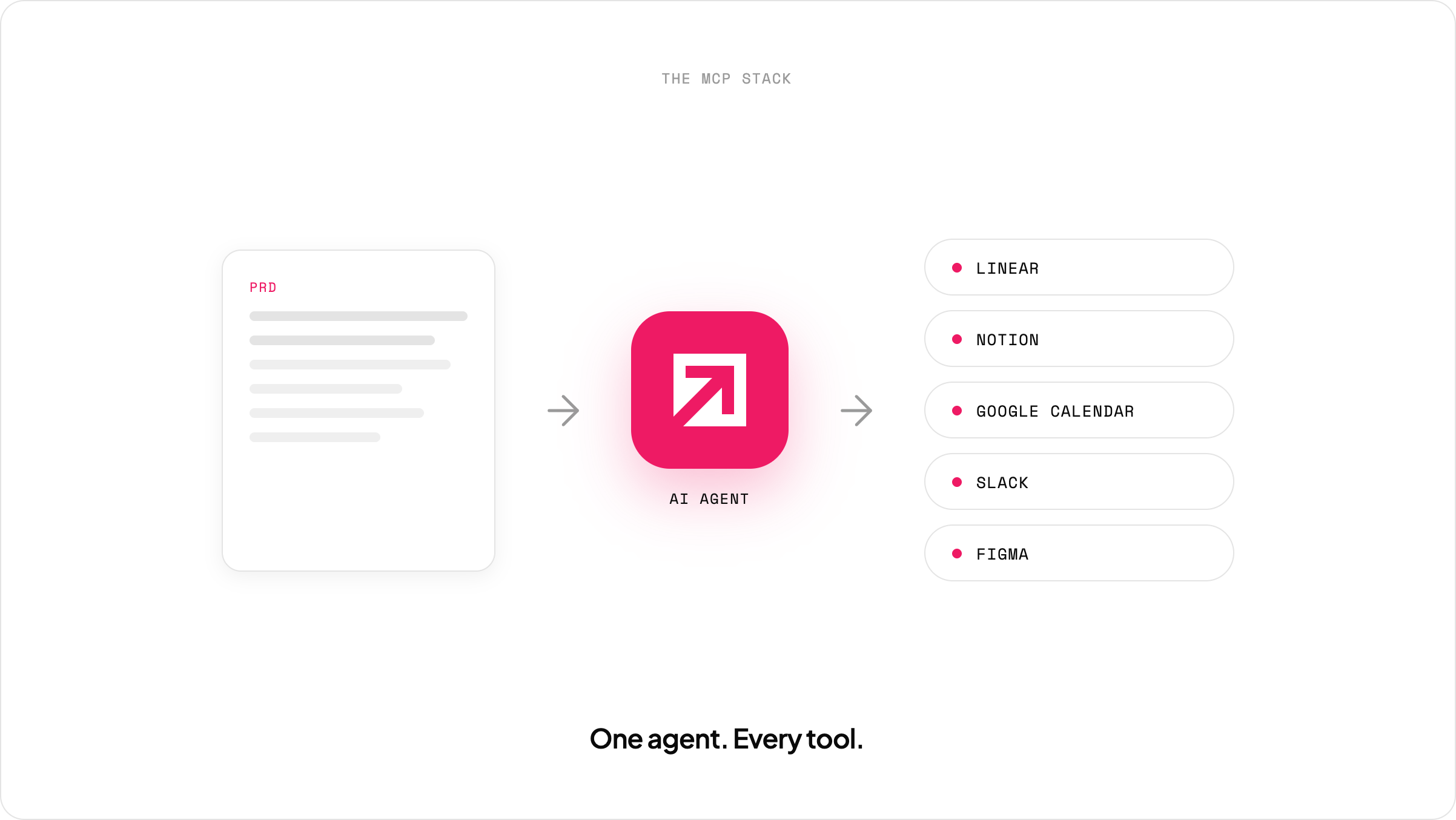
This is where the abstract framework becomes concrete. We built a complete demo environment (as of March 2026) with five workflows running on real tools: Linear, Notion, Google Calendar, Slack, and Figma, connected via MCPs and orchestrated through Claude Code.
We ran these as live demos for our PM team. Every workflow described below was executed in front of an audience, not in a controlled lab. Here's what we built and what it looks like in practice.
Workflow 1: PRD to Linear Project
The task: Take a product requirements document and create a complete project in Linear with epics, user stories, estimates, and priorities.
Before: A PM reads the PRD, manually creates each epic in Linear, writes each issue's description by translating user stories into ticket format, assigns estimates, and sets priorities. For a mid-size feature set, say, 5 epics and 18 issues, this takes 30 to 45 minutes of focused work.
After: The PM opens Claude Code, points it at the PRD file, and gives one instruction:
"Read the PRD. Create a new project in Linear called [project name]. Create the epics as labels. Create all issues with title, description based on the user stories, estimation in points, and priority. Assign each issue to its corresponding epic."
Claude reads the document, understands the structure (epics, user stories, acceptance criteria, priorities), and calls the Linear MCP to create everything. One minute. The PM then reviews in Linear, adjusting anything that needs a human judgment call.
We tested this with a fictitious delivery app PRD containing 5 epics and 18 user stories with acceptance criteria. The output in Linear matched the PRD structure with accurate descriptions, correct priority assignments, and reasonable point estimates. The PM's role shifted from data entry to review.
Workflow 2: Meeting Transcript to Backlog Updates
The task: After a client meeting, extract new feature requests, priority changes, and scope modifications, then update Linear accordingly.
Before: The PM listens to the recording or reads the transcript, takes notes on what changed, goes to Linear, finds the relevant issues, creates new ones, updates priorities on existing ones, and cancels anything removed from scope. For a meeting with three new feature requests, two priority changes, and one scope removal, this takes 30 to 40 minutes.
After: We built a custom skill, a Markdown file with natural language instructions, that processes meeting transcripts. The PM runs the skill with the transcript file as input. Claude reads the transcript, identifies changes (new features, priority shifts, scope removals), connects to Linear to check what already exists, and produces a structured proposal:
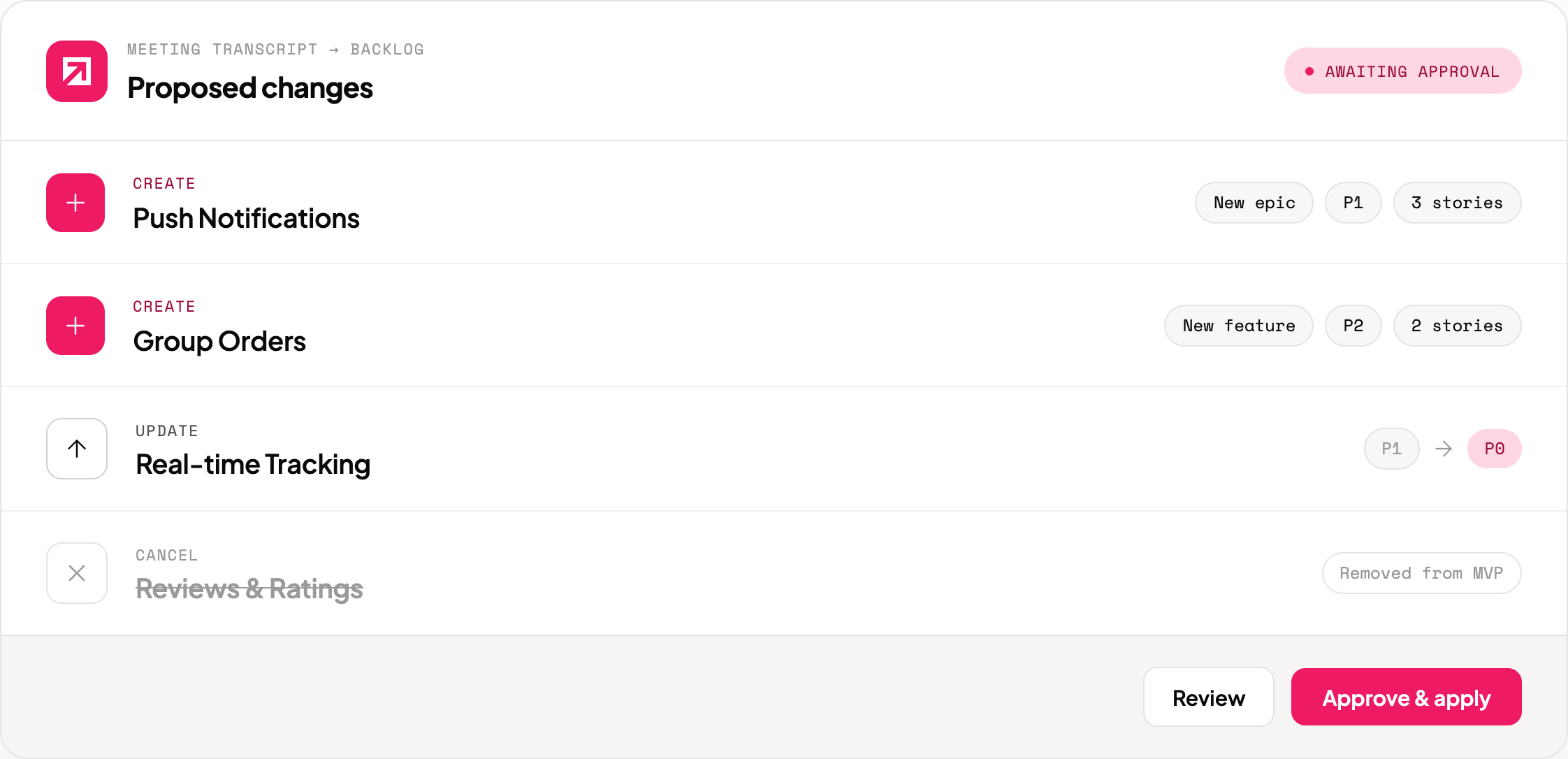
The critical design decision: Claude proposes but does not execute. It presents the table and waits for confirmation. The PM reviews, adjusts if needed, then approves. Only then does Claude apply the changes to Linear.
This "propose, then execute" pattern is non-negotiable for PM workflows. Unlike code generation where you can review a diff, backlog changes affect project scope and client expectations. The human stays in the decision loop.
Workflow 3: Automated Status Reports to Notion
The task: Generate a weekly status report from project data in Linear and publish it to Notion.
Before: Every Friday, the PM opens Linear, reviews each epic's progress, calculates completion percentages, identifies blockers, writes a summary, formats it, and posts it to Notion. Depending on project size, this takes 20 to 60 minutes.
After: We created a custom skill called "Weekly Report." It's a Markdown file that tells Claude to connect to Linear, pull the project data, calculate progress by epic, identify blockers, generate a formatted report, and publish it to Notion. The PM types /weekly-report and reviews the output.
The skill is written in plain language. No code. Any PM could write one by describing the report format they want. Here's what the skill does in sequence:
- Reads all issues from the active project in Linear
- Groups by epic, calculates percentage completed vs. in-progress vs. not-started
- Identifies blocked issues and extracts blocker descriptions
- Generates an executive summary, progress-by-epic breakdown, blockers section, and next steps
- Publishes to the designated Notion page
The result is a professional report that would take a human 30+ minutes to assemble. The PM's job becomes editing the summary and adding qualitative context that Linear data can't capture: client sentiment, strategic decisions, risk assessments.
Worth noting: this workflow is built on Linear and Notion, but the pattern applies to any project management and reporting stack. Jira, Asana, Monday, ClickUp. if there's an MCP or API, the same skill structure works. The skill describes what to do, not which tool to do it with. Swapping the data source is a configuration change, not a rewrite.
Workflow 4: Calendar Analysis
The task: Analyze the day's schedule, identify conflicts, calculate meeting load, and suggest optimization.
Before: PMs open their calendar, mentally scan for conflicts, estimate how much focus time they have left, and plan their day. This isn't a long task, maybe 5 to 10 minutes, but it happens every morning, and the analysis is always shallow.
After: Claude reads the Google Calendar MCP, pulls the day's events, and returns:
- Total meetings vs. available time
- Any scheduling conflicts
- Suggested reorganization for focus blocks
- Recommended time slots for specific tasks based on meeting gaps
This is the lightest workflow of the five, less about saving time, more about getting analysis that people skip because it feels trivial. A PM who sees "You have 6 hours of meetings and 2 hours of gaps, split across 4 fragments of 30 minutes" makes different decisions than one who glances at a crowded calendar and starts reacting.
Workflow 5: PRD to Figma Mockups
The task: Generate initial UI mockups from product requirements, published directly to Figma.
Before: The PM writes the PRD, hands it to a designer, waits for first-pass wireframes, gives feedback, iterates. First visual output: 2-5 days.
After: Claude reads the PRD, generates HTML/CSS for the key screens (mobile-first), spins up a local server, and uses the Figma MCP to capture and publish the screens. The output is not production design; it's a conversation starter. A PM can walk into a design kickoff with visual references instead of text descriptions.
We tested this by generating four screens for a delivery app: restaurant catalog, restaurant detail with menu, cart and checkout, and real-time order tracking. The mockups used a modern glassmorphism style. They're rough. They're also dramatically better than nothing, which is what PMs typically bring to design conversations.
This workflow has a clear limitation: it produces static screens, not interactive prototypes. It doesn't replace a designer. It gives PMs a way to communicate visual intent faster.
The MCP Stack
All five workflows depend on this MCP configuration:
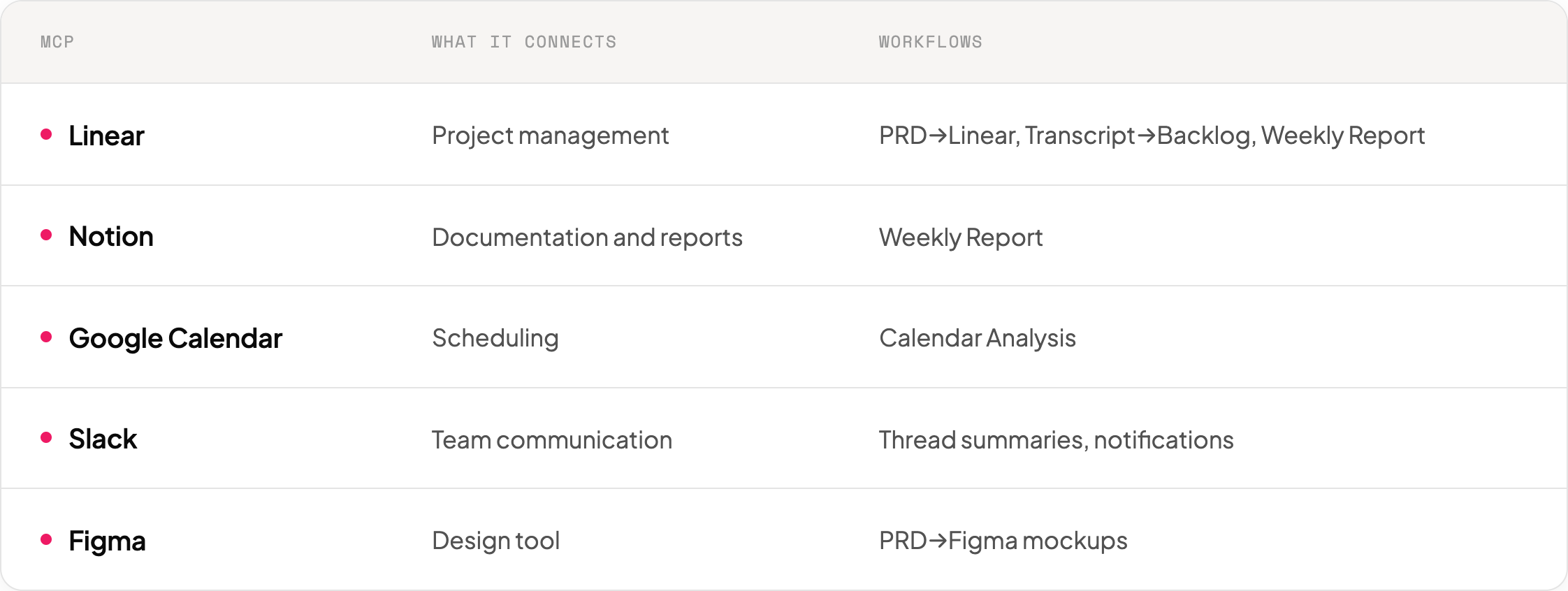
Each MCP is configured once in a JSON settings file. After that, Claude can read and write to the connected tool. The technical setup takes an engineer 15-30 minutes per MCP. After configuration, the PM never touches the setup again.
Two Custom Skills
Beyond the MCP connections, we built two reusable skills:
Weekly Report skill: A markdown file describing the report structure, data sources, and output format. The PM invokes it with /weekly-report. It's written in natural language; any PM could modify the template to match their team's reporting format.
Process Transcript skill: A markdown file that describes how to read a meeting transcript, extract changes, compare against the existing backlog, and propose updates. Invoked with /process-transcript [file].
These skills demonstrate something important: non-developers can create automation without code. A skill is a markdown file with instructions. If you can describe what you want in writing, you can build a skill.
HR, Delivery, Pre-Sales: The Frontier
We need to be direct about this section. Unlike the PM workflows, which are built, demoed, and running, the expansion to other roles is early-stage. We're sharing what we're exploring, not what we've shipped.
HR. The team has started using AI tools for structured, repetitive tasks, processing evaluation data, generating summaries from performance reviews, and drafting communications. These aren't full automated workflows yet; they're individual team members using Claude Code to speed up tasks they were already doing manually. The pattern is the same one we saw in engineering: organic adoption of basic capabilities, with deeper workflow automation as the next step.
Delivery. Delivery managers have adopted AI tools for sprint evaluation processing, client meeting note processing, and billing workflows. Repetitive reporting, pulling data, calculating utilization rates, and generating status updates are where the time savings are clearest. The integration surface is more fragmented than PM tools (no single MCP covers the typical delivery stack), but skills and automation scripts bridge the gap for now.
Pre-sales. The team uses AI tools for data processing, proposal drafting, and estimation support. Estimation and proposal generation involve reading RFPs, estimating effort, assembling team profiles, and drafting proposals; much of this is template-based with project-specific customization, which makes it a natural fit. The open question remains whether AI-generated estimates are accurate enough to meaningfully reduce review overhead, or whether the human review step stays just as long.
What we can say with confidence: the PM proof of concept validated the approach. The playbook (shadow, map, build, demo, iterate, measure) works for non-engineering roles. The MCP ecosystem is broad enough to cover most common business tools. The barrier isn't technology; it's the investment of time to shadow each role, understand its workflows, and build the custom skills.
We'll share specifics on HR, delivery, and pre-sales as those experiments mature. For now, these roles represent our active frontier, not our completed work.
What We Learned
Six months into cross-company AI expansion (as of April 2026), several patterns have emerged that we didn't anticipate:
Resistance looks different outside engineering. Engineers worry about AI code quality: "Will it break my production system?" Non-technical roles worry about job security, "Is this going to replace me?" The fear is more personal and more emotional. Addressing it requires a different conversation. We found that framing AI as "handles the repetitive parts so you can focus on judgment calls" lands better than "makes you more productive." Same truth, different emphasis.
The terminal is a real barrier. Claude Code runs in the terminal. Engineers don't think twice about this. For everyone else, the terminal is foreign. The "two commands to install" pitch that works for developers falls flat with PMs. We needed an engineer to handle initial setup and MCP configuration. We also needed to show that the actual interaction is natural language; you type what you want in plain words. Once people see that, the terminal stops being scary. But that first impression matters.
Skills are the unlock for non-developers. MCPs connect tools. But skills are what make the connection useful. A PM doesn't want to think about which MCP to call or how to structure a request. They want to type /weekly-report and get their report. Custom skills turn a general-purpose agent into a role-specific assistant. This is where the real value accrues for non-engineering roles. And here's the part we didn't expect: PMs are now building their own skills library. They started by using the skills we built for them, then began writing new ones for workflows we hadn't anticipated. The tool went from "something engineering set up for us" to "something we own and extend." That's the adoption inflection point, when the role stops consuming and starts creating.
Value measurement changes completely. For developers, we measure feature utilization rates, code quality metrics, and development time. For PMs, the metric is time reclaimed from administrative work. For HR, it would be screening throughput. For delivery, it would be reporting accuracy and speed. Each role needs its own success metrics, defined before you start building. If you use engineering metrics to evaluate a PM workflow, you'll conclude it doesn't work even when it does.
The "propose, don't execute" pattern is essential. In our engineering training (The Mathi Problem taught us this the hard way), we learned that AI needs verification loops. For non-engineering roles, the stakes are different, but the principle is the same. A status report published to Notion with wrong numbers is a trust problem. A backlog update that deletes the wrong issues is a scope problem. Every PM workflow includes a confirmation step. Claude shows what it plans to do and waits for approval.
Adoption spreads through demonstration, not documentation. We wrote guides. Nobody read them. We ran a live demo where a PM saw her actual weekly report generated in 30 seconds. She started using it the next day. For non-technical roles, seeing is adopting. The demo project we built for PMs wasn't just a training tool; it was the adoption mechanism.
How to Start in Your Company
If you're considering expanding AI tools beyond engineering, here's the framework we'd recommend based on what worked for us:
- Step 1: Pick one non-engineering role. Choose the role with the highest combination of task repetitiveness + tool accessibility + willingness to experiment. For most companies, this is PMs or technical writers.
- Step 2: Shadow before building. Spend a week observing the actual workflows. Don't assume you know what a PM does all day. Document every task, tool, and time spent. The insights will surprise you.
- Step 3: Start with three workflows. Don't try to automate everything. Pick the three most repetitive tasks that use tools with MCP integrations. Build those. Demo those. Get feedback on those.
- Step 4: Build custom skills, not raw prompts. Non-technical users shouldn't need to craft prompts. Build skills (markdown templates with instructions) that they invoke with a single command. The skill abstracts the complexity.
- Step 5: Measure time savings, not "AI usage." Just like tool adoption doesn't equal feature utilization, "using AI" doesn't mean "getting value from AI." Measure hours reclaimed per week. That's the number that justifies expanding to the next role.
- Step 6: Iterate before expanding. Don't move to the next role until the current one is stable. We spent three months on the PM proof of concept before even discussing HR or delivery. Rushing to breadth kills depth.
The framework described above- evaluation criteria, the shadow-map-build-demo-iterate-measure sequence, and role-specific success metrics- is what we use for every new role expansion.
What's Next
We're still in the early chapters of this expansion. The PM workflows are the most advanced, but still evolving; PMs are building their own skills and finding new use cases we didn't anticipate. HR, delivery, and pre-sales are earlier in the process. The playbook exists but is still being validated across roles.
What we're confident about: the same tools that transformed how our engineers work have clear applications beyond engineering. The barrier isn't the technology; it's the investment in understanding each role deeply enough to build workflows that fit.
What we're not confident about: how far this extends. Some roles may not benefit. Some tools may not have adequate MCP integrations. Some workflows may be too nuanced for current AI capabilities.
We'll keep building, measuring, and publishing what we learn. The philosophy that runs through everything our AI Engineering group does applies here too: "Try and change. Don't expect a setup that works for years." The tools evolve. The roles evolve. Our approach has to evolve with them.
For the full story of how we got here, from the 85% adoption / 0% Skills discovery to building a structured training program to developing a prevention-first approach to AI code quality, start at the hub.
Further Reading
- The Feature Utilization Gap: What 85% AI Tool Adoption Really Looks Like, The data that led to building this workshop
- The Mathi Problem: Why AI-Generated Features Ship Fast and Break Slow, The full story behind Module 6's core anecdote
- AI Tools Are Not Just for Developers: How We're Expanding Beyond Engineering, What happened when we applied similar thinking to PMs, HR, and delivery
- Anthropic Skilljar: Claude Code in Action, an external training resource we recommend as a supplement
- Anthropic Prompt Engineering Guide, Foundation for the Prompt Formula, taught in Module 1
This article is part of our AI journey series. Published April 2026. The tools, features, and recommendations described here reflect the landscape as of that date. AI tooling moves fast; verify current capabilities before building on our specific tool recommendations.

